WennSoft / Hire-Rental
WennSoft Signature Equipment Management — Service Management, Job Cost, and Equipment Management modules integrated with Microsoft Dynamics GP via SmartConnect and eConnect middleware.
Application Overview
Tier-1 / High Risk| Area | Details |
|---|---|
| Application Name |
WennSoft: Signature, Schedule, TBD MobileTech, Woodford (form builder) https://mobiletech.aidacare.com.au/HANDR Resco Cloud: https://aidacare.rescocrm.com |
| Business Function | Service Management |
| Hosting | Hybrid: On-Prem for WennSoft, MobileTech; SaaS Cloud for Resco |
| Support Vendor | WennSoft |
| Key Contact | TBD |
| Criticality | Tier-1 / High Risk |
| Core Purpose | Service Mgt, Job Scheduling, Field Operations |
| ERP Integration | Microsoft Dynamics GP |
| Integration Method | Out of the box (Productised) |
Components & UI
6 Components| Component | UI |
|---|---|
| WennSoft Signature Service Management | GP-integrated screens/windows inside the Dynamics GP client |
| WennSoft Schedule |
Scheduling/dispatch UI associated with Signature; GP-integrated scheduling screens; separate scheduling component also |
| MobileTech Administration |
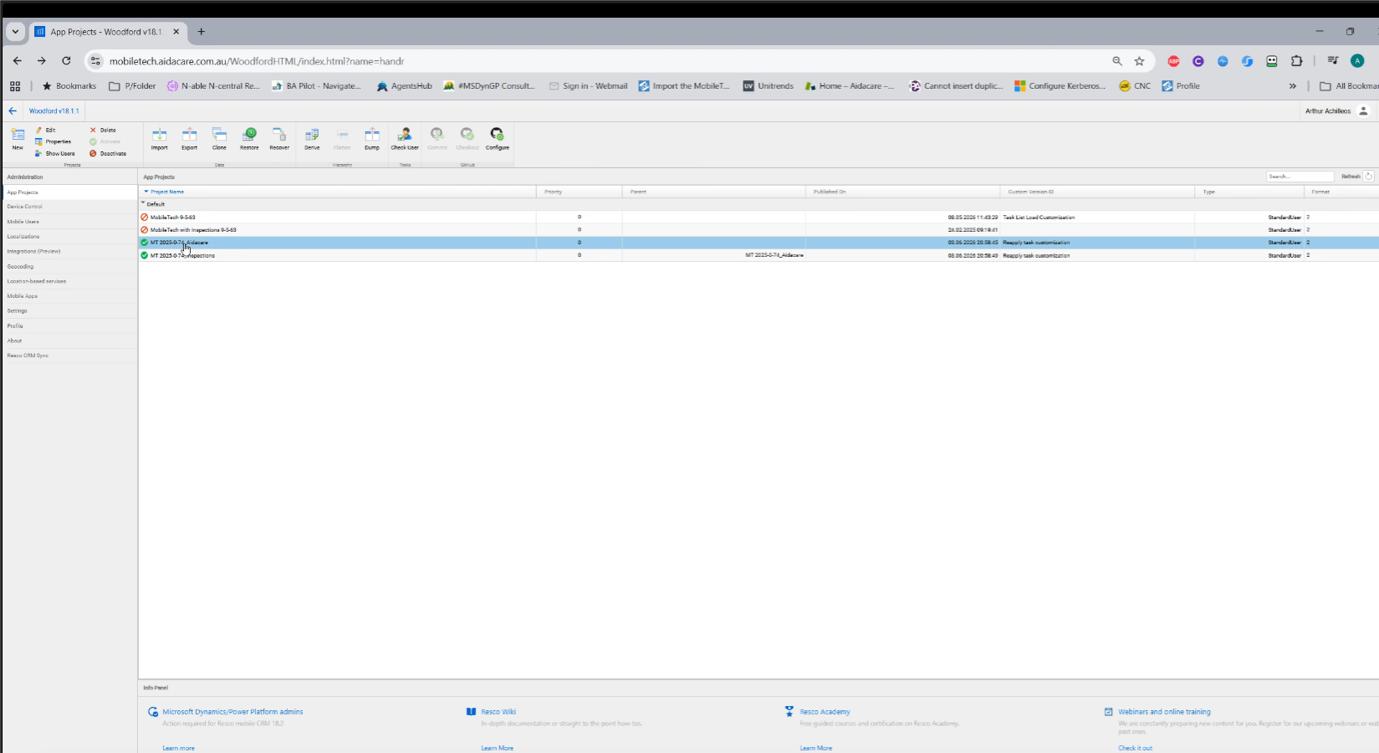
Admin console / server-side administration https://mobiletech.aidacare.com.au/HANDR |
| Resco Cloud / Dashboard |
Web portal for Resco/mobile admin, sync, Woodford, reporting/configuration https://aidacare.rescocrm.com |
| Woodford |
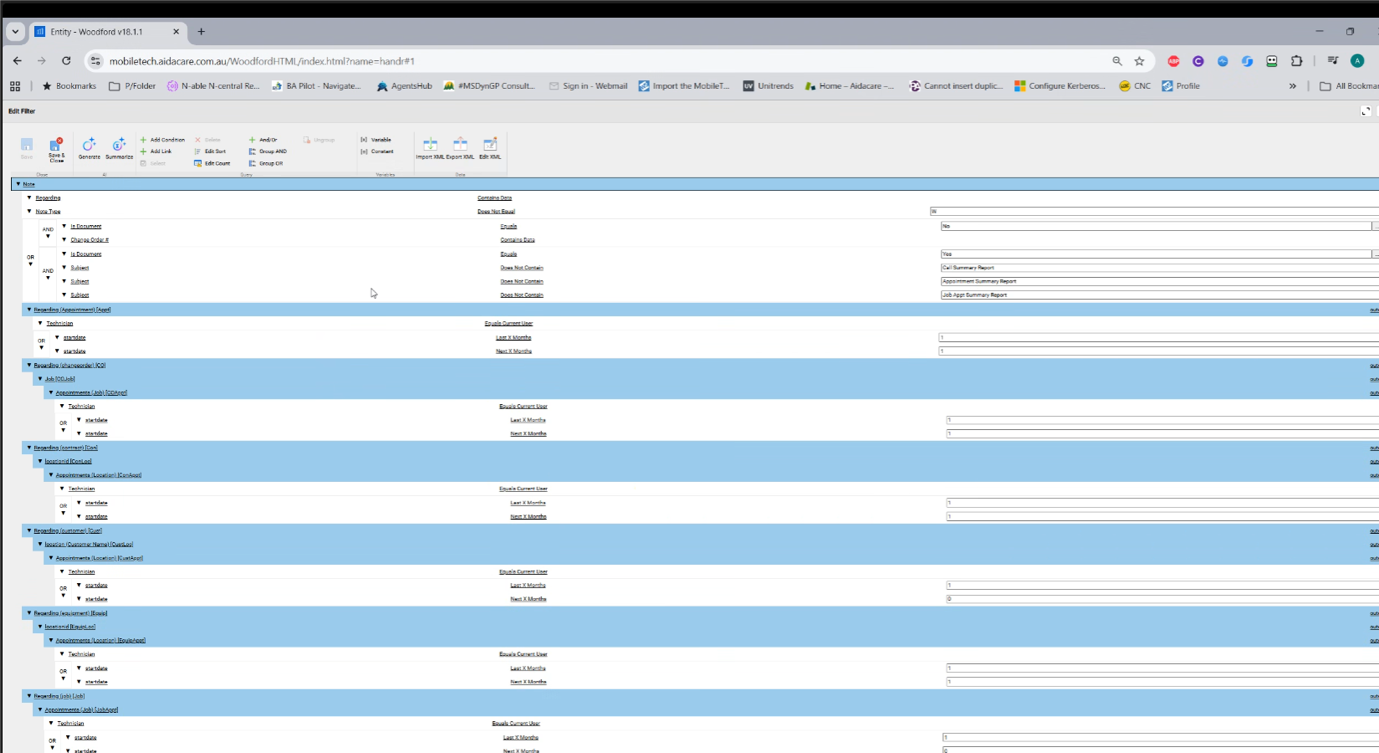
Web-based/configuration designer accessed through portal tooling https://mobiletech.aidacare.com.au/HANDR |
| Resco CRM / MobileTech app | Mobile app on technician phone/tablet/rugged mobile device |
Business Capabilities in WennSoft and around it
6 Components| Component | Primary Business Purpose | Key Business Capabilities | Primary Users / Actors | Typical UI / Access Point |
|---|---|---|---|---|
| WennSoft Signature Service Management | Core service management layer integrated with the GP environment | Manage service calls, work orders, equipment/assets, service contracts, service history, labour, parts, completion status, follow-up work, billing readiness and service lifecycle | Service coordinators, back-office service users, finance/service admins | Screens inside Dynamics GP desktop/Citrix client |
| WennSoft Schedule | Dispatch and appointment scheduling | Schedule technicians, assign appointments, manage technician availability, allocate work by date/time/resource, review service priority, plan routes/appointments, manage dispatch board | Dispatchers, service coordinators, scheduling team | Scheduling / dispatch board |
| MobileTech | Mobile field-service enablement for technicians | Publish jobs to technicians, receive job updates, capture labour, parts, notes, photos, checklist responses, signatures, job status, completion and follow-up information | Field technicians, mobile support admins, service coordinators | MobileTech admin console + technician mobile app |
| Resco CRM / Resco Mobile Platform | Mobile runtime, offline sync and technician app platform | Mobile app execution, offline capability, synchronisation, mobile data capture, local device data store, sync conflict handling, mobile forms, mobile inspections/checklists, device-side technician workflow | Field technicians, mobile platform admins | Resco CRM / MobileTech app on phone, tablet or rugged mobile device; Resco web portal/admin |
| Woodford | Mobile app configuration and customisation layer | Configure mobile forms, views, rules, validations, entities, roles, offline profiles, mobile project publishing and technician screen behaviour | Mobile platform admins, solution/configuration admins, vendor/P2S support | Woodford configuration designer / Resco admin tooling |
| CMP | Customer / contract / order context capture and front-end request management | Capture customer requests, service-related enquiries, contract/order context, customer/site details, product or asset-related request information, status visibility back to service/customer teams | Customer service team, service operations, sales/service admin | Custom web application |
System Profile
3rd Party Add-on- Product
- WennSoft Signature Equipment Management
- Version
- 14.0.2.0 (2015 R)
- Vendor
- WennSoft / Key2Act (Jonas Software group)
- App Server
- AIDAGPDEV01V (shared with GP)
- Database Server
- AIDASQL01P
- GP Database
- HANDR / TWO (WS-prefixed tables)
- Modules
- Service Management, Job Cost, Equipment Management
- Middleware
- SmartConnect (eOne Solutions), eConnect (GP-native)
- Criticality
- Tier-1 — Mission-critical
- Technical Owner
- Arthur Achilleos (L2 Integration)
- Source Document
- MS-GP Integration Low Level Design.docx — Section 3
WennSoft Modules
3 Core ModulesData Flow Overview
4-Stage PipelineAll WennSoft integrations follow a consistent four-stage data pipeline from source capture through to GP/WennSoft operational visibility.
Integration Register Snapshot
7 Active JobsThe following SmartConnect job register diagram from the LLD shows all active WennSoft integration jobs configured in the Aidacare environment.
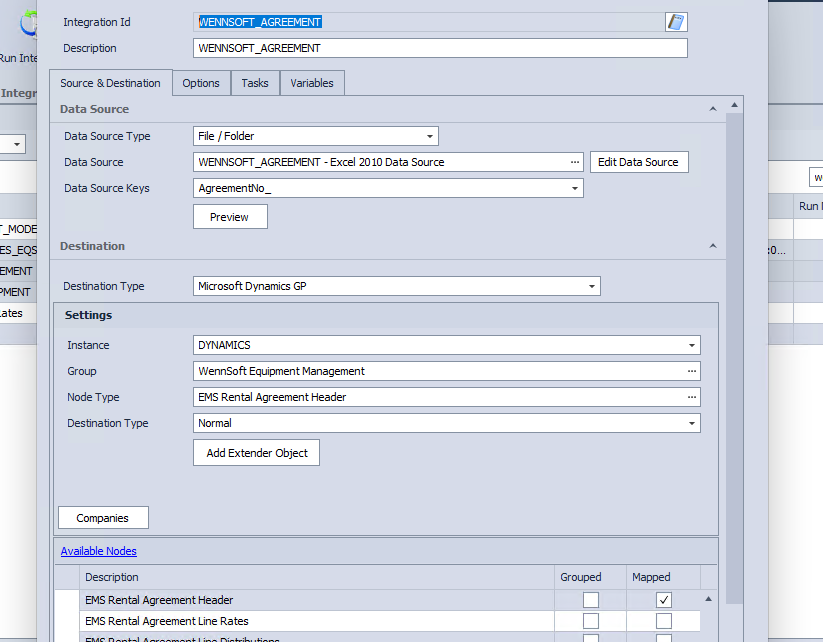
Source: MS-GP Integration Low Level Design.docx — Section 3 SmartConnect Job Register
WennSoft Integration Architecture
LLD DiagramThe diagram below (from the MS-GP Integration Low Level Design document) shows the full end-to-end integration architecture for WennSoft — covering source systems, middleware layers, GP/WennSoft target, and physical infrastructure.
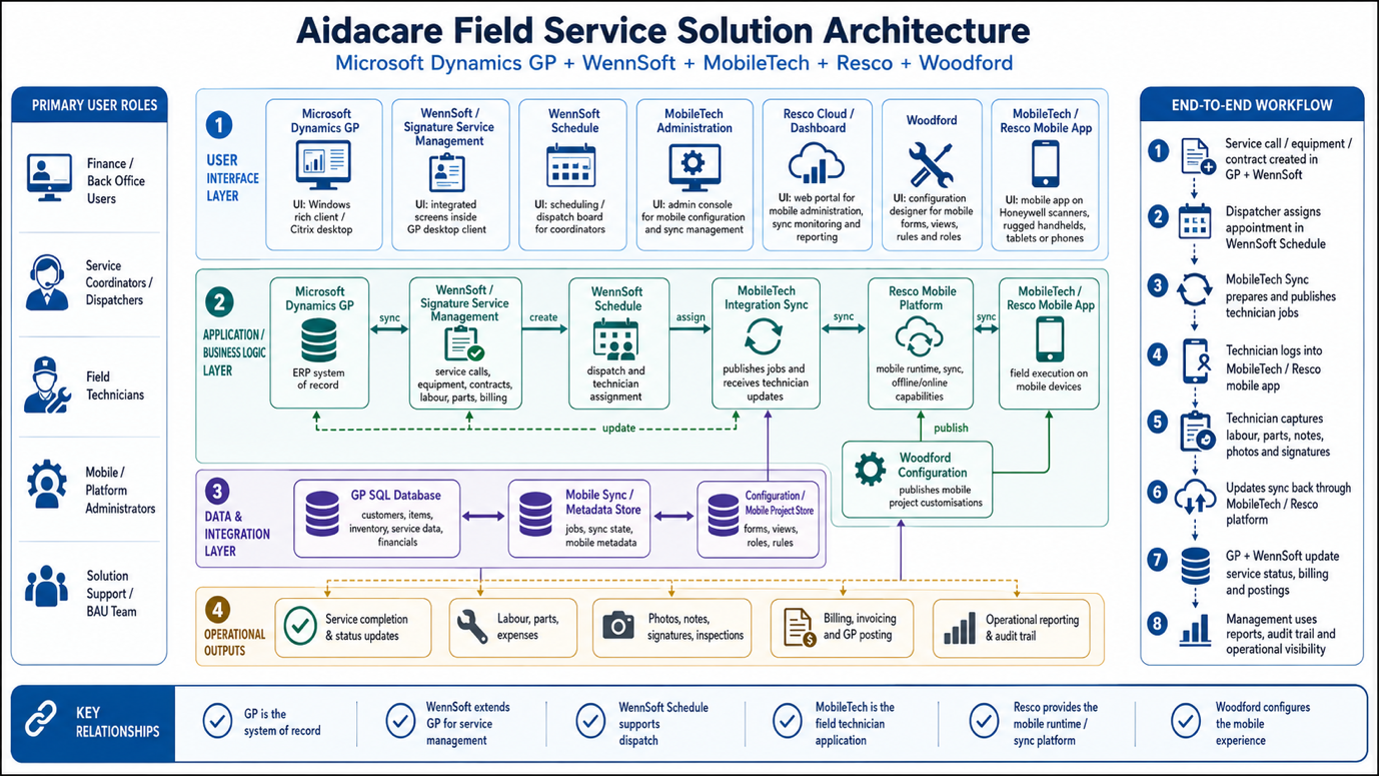
Figure: WennSoft Integration Architecture — MS-GP Integration Low Level Design.docx
Logical Architecture
DesignWennSoft sits inside the GP framework — it extends GP rather than existing as a standalone system. It shares the GP application dictionary and the same SQL database, meaning all WennSoft data is physically resident in the GP database (HANDR / TWO) under WS- and SV-prefixed tables.
- ERP Engine
- Microsoft Dynamics GP (Great Plains)
- WennSoft Layer
- Key2Act (WennSoft) — registered GP add-on dictionary, co-resident with GP client
- Table Namespace
- WS-prefixed tables (Equipment, Rates, Agreements) and SV-prefixed tables (Service) within the GP database
- Integration Method
- External data feeds via SmartConnect (bulk/scheduled) and eConnect (productised GP API)
- Data Direction
- Primarily inbound — external sources (Excel, SQL) push into GP/WennSoft tables
- Shared Components
- GP dictionary, DYNAMICS system database, TWO/HANDR company database, GP login infrastructure
Physical Architecture
Infrastructure- Database Server
- AIDASQL01P (production alias: SQLPROD01) — hosts the SQL Server instance and all GP / WennSoft physical tables
- App Server
- AIDAGPDEV01V (alias: GPAPP01) — hosts the GP Client, WennSoft Code Dictionary, and SmartConnect Windows Service
- Connectivity
- LAN / VLAN, TCP Port 1433 (SQL Server standard)
- Authentication
- MS_GP connection profile used by SmartConnect jobs (SQL Authentication)
- Encryption
- Not enabled on SmartConnect integration connections (review recommended)
- Databases
- DYNAMICS (system DB), HANDR / TWO (company DB hosting WennSoft tables)
Tools & Technologies
| Technology | Role | Used By | Notes |
|---|---|---|---|
| SmartConnect | Integration middleware — orchestrates scheduled batch jobs, field mapping, and data retrieval from source files | All 7 WennSoft integrations | eOne Solutions product; runs as Windows Service on AIDAGPDEV01V |
| eConnect | Productised GP integration API — validates business rules and commits data to GP/WennSoft tables | WENNSOFT_RENTAL_RATES, WENNSOFT_EQUIPMENT | Microsoft-provided GP integration layer; enforces GP business logic |
| ODBC | Data source connectivity — SmartConnect reads Excel and SQL sources via ODBC connections | Excel-sourced integrations | Standard ODBC drivers; Excel files staged in agreed network path |
| Microsoft SQL Server | Physical database tier — hosts all GP and WennSoft tables (WS-, SV-prefixed) | All integrations | Hosted on AIDASQL01P; Port 1433; T-SQL used for error investigation |
| Microsoft Excel | Source file format — operational data staged in Excel workbooks for SmartConnect ingestion | WENNSOFT_RENTAL_RATES, WENNSOFT_EQUIPMENT, EXCEL_WENNSOFT_MODELS | Files must be placed in correct network path before scheduled run time |
| Flat File (T-SQL / Batch) | SQL scripts used for manual reprocessing and DBA-level error correction | DBA / L3 support | Used when automated retry is not available; requires DBA approval |
Integration Data Flow Diagram
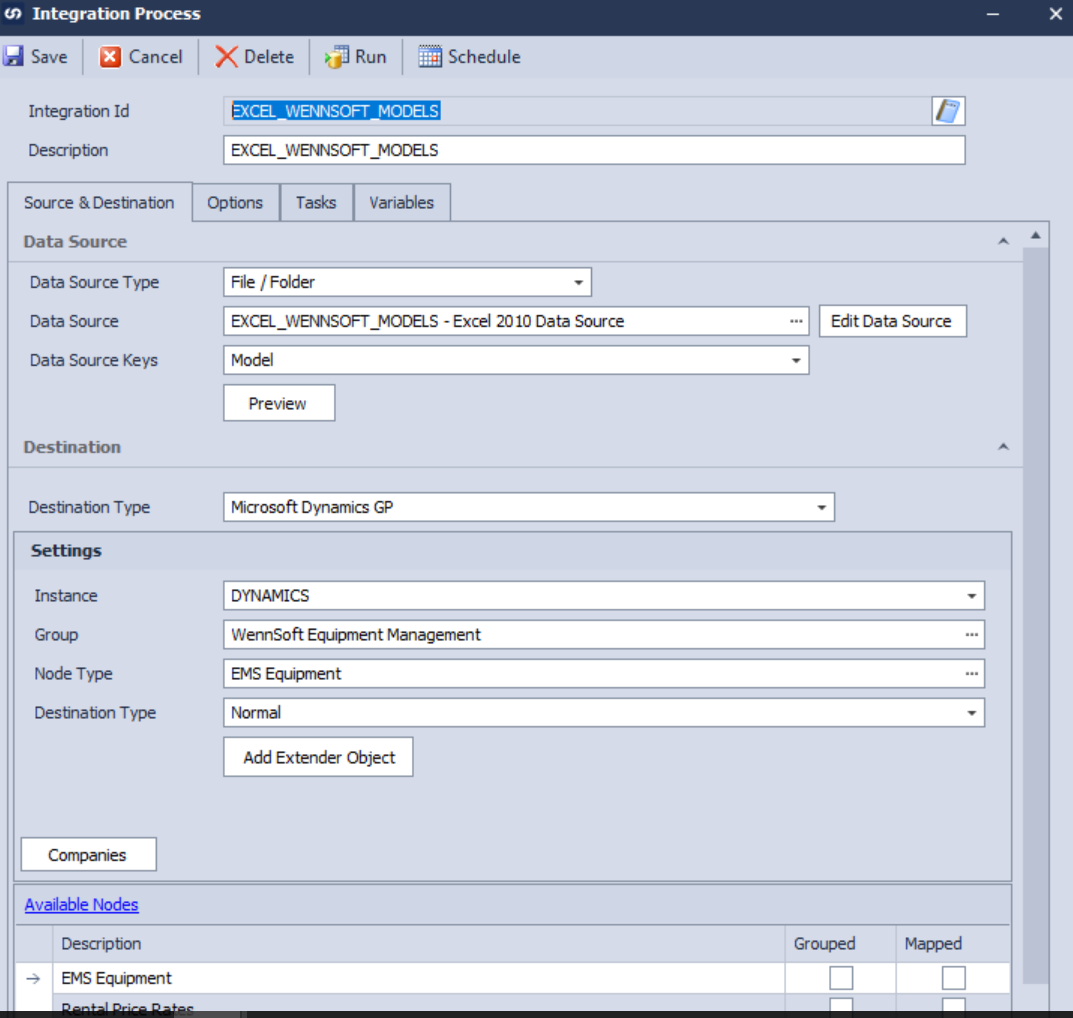
Figure: WennSoft Integration Data Flow — MS-GP Integration Low Level Design.docx
Integration Register
7 Active Integrations| Integration ID | Direction | Frequency | Source | Purpose | Criticality | Owner |
|---|---|---|---|---|---|---|
| WENNSOFT_RENTAL_RATES | Excel → GP/WennSoft | Daily 8:00 AM | Excel | Updates daily rental rate structures for equipment fleet | High | Arthur Achilleos |
| WENNSOFT_EQUIPMENT | Excel → GP/WennSoft | Daily 8:00 AM | Excel | Imports new serialized equipment units into master asset registry | High | Arthur Achilleos |
| WENNSOFT_AGREEMENT | GP/WennSoft → GP | Scheduled batch | WennSoft | Facilitates bulk creation and renewal of service agreements for customer equipment | Medium | TBD |
| WENNSOFTMODELS | GP/WennSoft → GP | Scheduled batch | WennSoft | Defines equipment model blueprints, manufacturers, and technical classes | Medium | TBD |
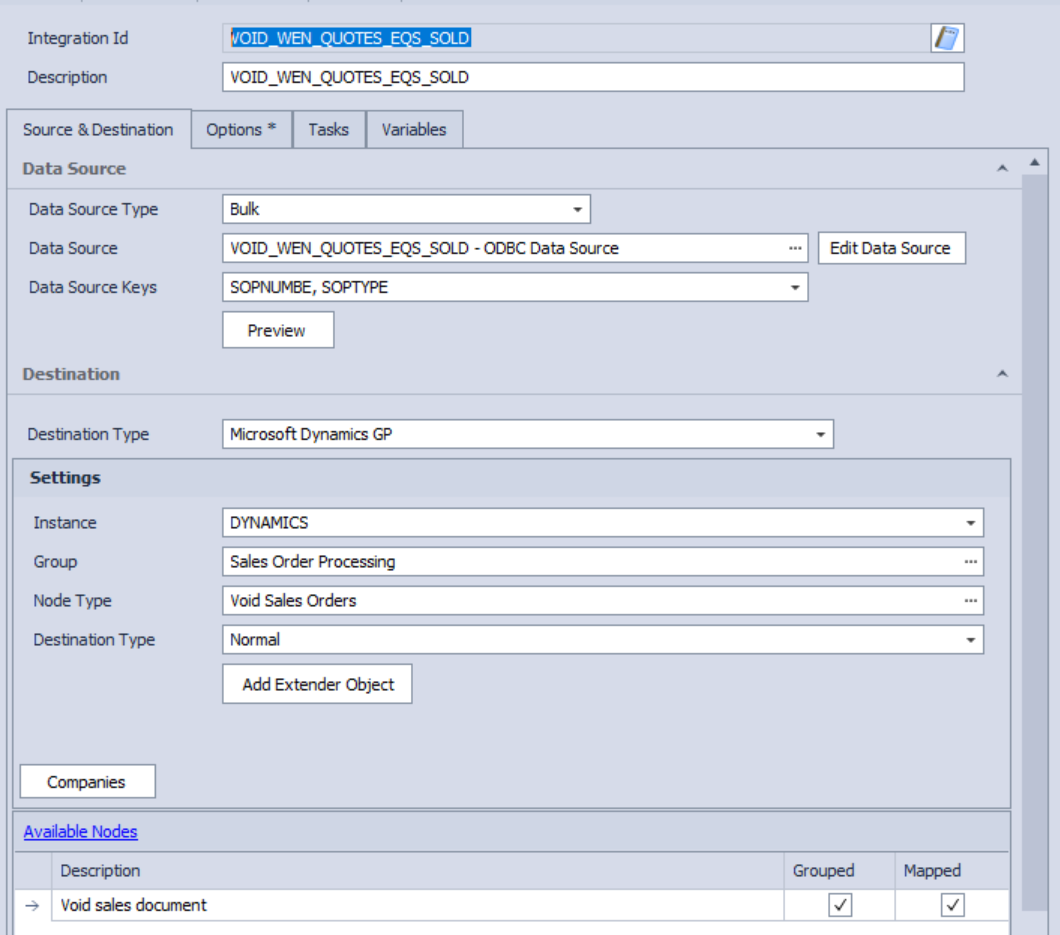
| VOID_WEN_QUOTES_EQS_SOLD | Internal WennSoft | Event-triggered | WennSoft | Automated cleanup utility — voids open service quotes when equipment is marked as sold | Standard | TBD |
| WS_BRANCHES | GP ↔ WennSoft | Scheduled batch | GP | Syncs branch office codes and regional service territory configurations | Medium | TBD |
| EXCEL_WENNSOFT_MODELS | Excel → GP/WennSoft | On-demand | Excel | Bulk update utility for administrative changes to equipment model catalog | Standard | TBD |
SmartConnect Job Configuration
SmartConnect job configuration screenshot from the Aidacare environment showing WennSoft integration jobs, schedule settings, and connection profiles.
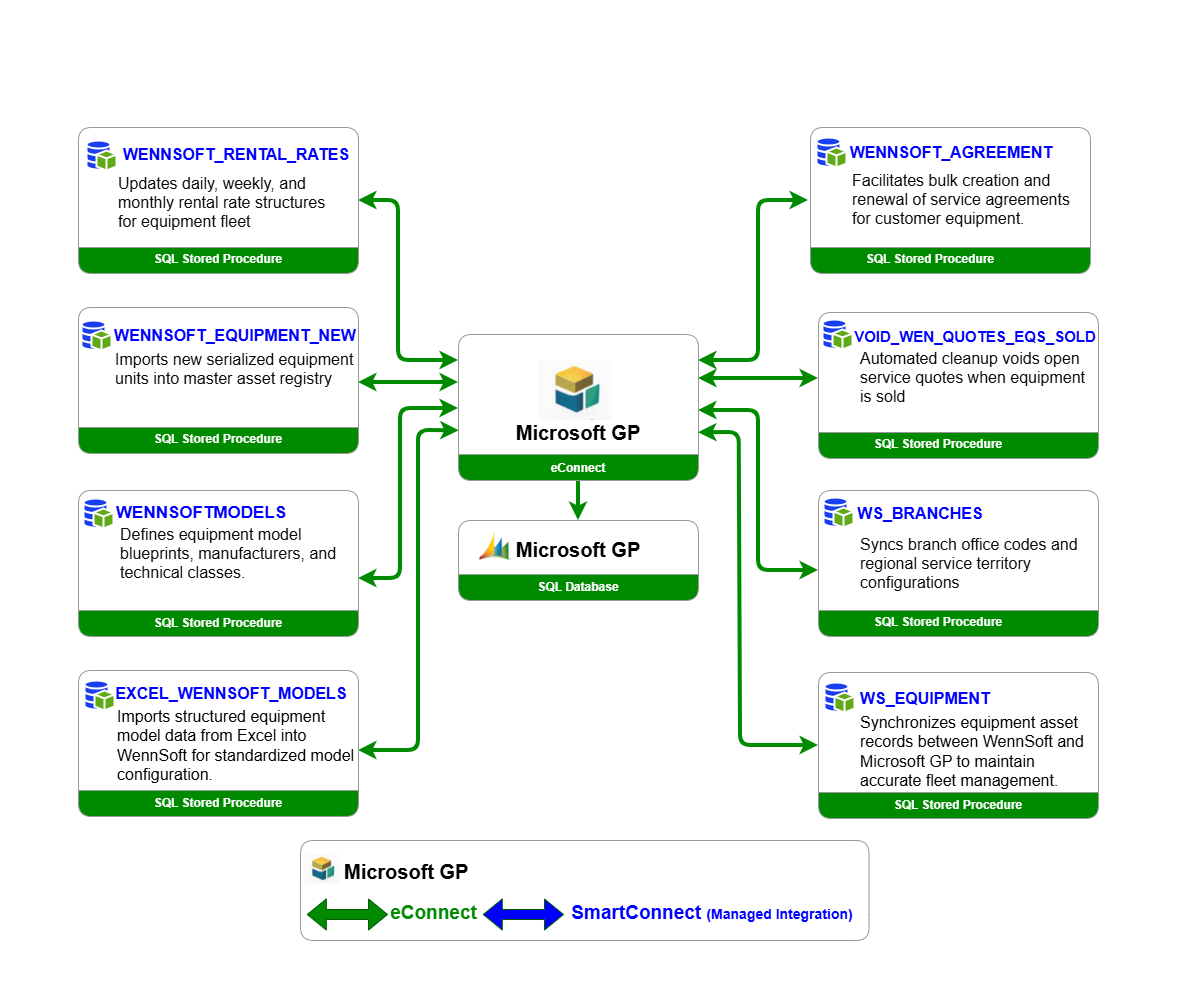
Source: MS-GP Integration Low Level Design.docx — SmartConnect job configuration screenshot
Integration Detail — All 7 Jobs
Updates the daily rental rate structures for the Aidacare equipment fleet. Source data is provided in Excel and processed via SmartConnect into the GP/WennSoft EMS Rental Rates node.
- Source System
- Microsoft Excel (staged file)
- Target System
- Microsoft Dynamics GP — WennSoft EMS Rental Rates Node
- Direction
- Inbound
- Frequency
- Daily at 8:00 AM
- Middleware
- eOne SmartConnect Desktop
- Authentication
- MS_GP connection profile
- Encryption
- Not enabled
- Technical Owner
- Arthur Achilleos
- Error Handling
- No automatic retry — failed records corrected and reprocessed manually
Automates the creation of equipment records from Excel into the ERP — ensuring every serialized unit in the Aidacare fleet is available for service dispatch, rental contracts, and maintenance history tracking.
- Source System
- Microsoft Excel
- Target System
- Microsoft Dynamics GP (WennSoft / Key2Act) Equipment Master
- Direction
- Inbound
- Frequency
- Daily at 8:00 AM
- Middleware
- eOne SmartConnect Desktop
- Technical Owner
- Arthur Achilleos
- Business Rule
- Equipment must be linked to a valid Model; Equipment ID and Serial Number must be unique; equipment must be created before being assigned to service, rental, or billing workflows
- Error Handling
- No automatic retry — failed records corrected and reprocessed manually
Facilitates the bulk creation and renewal of service agreements for customer equipment. Service agreements govern the terms under which WennSoft schedules preventive maintenance, technician visits, and billing cycles for equipment in the field.
- Purpose
- Bulk creation and renewal of service agreements in WennSoft Service Management
- Middleware
- SmartConnect / eConnect
- Target Tables
- SV-prefixed service agreement tables in GP/WennSoft database
- Detail Status
- Full field-level detail not documented in LLD — obtain from Arthur Achilleos
Defines the equipment model blueprints, manufacturers, and technical classification hierarchies used across the WennSoft Equipment Management module. Model records are a prerequisite for equipment unit creation (WENNSOFT_EQUIPMENT depends on this data being present).
- Purpose
- Define equipment model master records — manufacturer, model class, technical specifications
- Dependency
- WENNSOFT_EQUIPMENT requires valid Model IDs — this integration must run first
- Middleware
- SmartConnect / eConnect
- Detail Status
- Full field-level detail not documented in LLD — obtain from Arthur Achilleos
An automated cleanup utility that voids open WennSoft service quotes when the associated equipment record is marked as sold in GP/WennSoft. Prevents stale service quotes remaining open against disposed or sold assets.
- Trigger
- Equipment status updated to "Sold" in WennSoft Equipment Management
- Action
- Voids all open service quotes linked to the sold equipment unit
- Purpose
- Data hygiene — prevents stale quotes from distorting pipeline and service KPIs
- Detail Status
- Implementation detail (stored procedure vs. SmartConnect) not confirmed in LLD
Synchronises Aidacare branch office codes and regional service territory configurations into WennSoft. Branch codes are referenced on Equipment records (EquipmentBranch field) and drive dispatch territory assignment in Service Management.
- Purpose
- Sync branch codes and service territory definitions between GP and WennSoft
- Impact
- Equipment-to-branch assignment and service dispatch territory rely on this data being current
- Middleware
- SmartConnect / eConnect
- Detail Status
- Field mapping detail not documented in LLD — obtain from Arthur Achilleos
An on-demand bulk update utility used by administrators to apply changes to the equipment model catalog via Excel. Used when multiple model records require update simultaneously — avoids manual data entry in the GP/WennSoft UI for large batches.
- Source
- Microsoft Excel (administrator-prepared workbook)
- Target
- WennSoft Equipment Model master records in GP database
- Trigger
- On-demand — manually initiated by administrator via SmartConnect
- Use Case
- Bulk model description changes, new manufacturer additions, category reclassification
- Detail Status
- Field mapping detail not documented in LLD — obtain from Arthur Achilleos
Integration Profile
High Criticality- Integration ID
- WENNSOFT_RENTAL_RATES
- Source System
- Microsoft Excel (staged source file)
- Target System
- Microsoft Dynamics GP — WennSoft EMS Rental Rates Node
- Direction
- Inbound (Excel → GP/WennSoft)
- Frequency
- Daily at 8:00 AM
- Middleware
- eOne SmartConnect Desktop
- GP Connection
- MS_GP connection profile
- Encryption
- Not enabled
- Technical Owner
- Arthur Achilleos (L2)
- Criticality
- High — Rental pricing affects hire contracts and revenue
Business Rules
Validation GatesField Mapping — Source to Target
All Direct Mapping| # | Source Field (Excel) | Target Field (GP/WennSoft) | Target Node | Mandatory | Notes |
|---|---|---|---|---|---|
| 1 | CURNCYID |
CURNCYID |
EMS Rental Rates | Yes | Currency ID — must match a valid currency in GP |
| 2 | EQS_Rental_Rate |
EQS_Rental_Rate |
EMS Rental Rates | Yes | Numeric rental rate value for the equipment |
| 3 | EQS_Price_Rate_Ord |
EQS_Price_Rate_Ord |
EMS Rental Rates | Yes | Ordering sequence for rate priority within a rate template |
| 4 | EQS_Price_Rate_ID |
EQS_Price_Rate_ID |
EMS Rental Rates | Yes | Rate identifier — must be unique within the rate template |
| 5 | EQS_Price_Template_ID |
EQS_Price_Template_ID |
EMS Rental Rates | Yes | Price template the rate belongs to — must exist in WennSoft |
| 6 | EQS_Rental_U_of_M |
EQS_Rental_U_of_M |
EMS Rental Rates | Yes | Unit of measure for the rental period (e.g. DAY, WEEK, MONTH) |
| 7 | Item_UOM |
Item_UOM |
EMS Rental Rates | Yes | Item unit of measure — must match GP Item UOM Schedule |
| 8 | PRCLEVEL |
PRCLEVEL |
EMS Rental Rates | Yes | Price level — maps to a GP pricing level definition |
| 9 | EQS_Price_Rate_Type |
EQS_Price_Rate_Type |
EMS Rental Rates | Yes | Rate type classification (e.g. Standard, Customer-Specific, Promotional) |
SmartConnect Field Mapping Screenshot
SmartConnect field mapping configuration for WENNSOFT_RENTAL_RATES showing source Excel columns mapped to the target GP/WennSoft EMS Rental Rates node fields.
Source: MS-GP Integration Low Level Design.docx — WENNSOFT_RENTAL_RATES field mapping
Escalation Path
3-Tier Support| Level | Role | Actions | Escalate When |
|---|---|---|---|
| L1 | ERP Support | Review SmartConnect error log; identify failed records; check source Excel for data issues; correct source data and trigger manual reprocessing | Cannot identify root cause; system-level errors (SQL, timeout, login failure) |
| L2 | Integration Technical Owner (Arthur Achilleos) | Review SmartConnect job configuration; validate field mappings; check GP Item Master for missing items; update GL mapping if required (KE-02) | Configuration issue confirmed; GP database or infrastructure involvement required |
| L3 | DBA / Infrastructure | Investigate SQL-level errors (deadlocks, timeouts, FK violations); review SQL Server error logs on AIDASQL01P; perform table-level data correction if approved | SQL Server errors, data corruption, login failure at server level |
Purpose & Business Value
High CriticalityThe WENNSOFT_EQUIPMENT integration is the primary mechanism by which new equipment units enter the Aidacare ERP. Without this integration, each unit would require manual creation in the GP/WennSoft UI — introducing data entry risk and delays to operational availability.
Integration Profile
- Integration ID
- WENNSOFT_EQUIPMENT
- Source System
- Microsoft Excel
- Target System
- Microsoft Dynamics GP — WennSoft / Key2Act Equipment Master
- Direction
- Inbound (Excel → GP/WennSoft)
- Frequency
- Daily at 8:00 AM
- Middleware
- eOne SmartConnect Desktop
- Technical Owner
- Arthur Achilleos (L2)
- Criticality
- High — Fleet availability depends on this integration
- Error Handling
- No automatic retry — failed records corrected and reprocessed manually
Field Mapping — Source to Target
| # | Source Field (Excel) | Target Field (GP/WennSoft) | Description | Mandatory | Notes |
|---|---|---|---|---|---|
| 1 | Branch |
EquipmentBranch |
Aidacare branch the equipment is assigned to | Yes | Must match a valid branch code in WS_BRANCHES master |
| 2 | EquipmentID |
EQSEquipmentID |
Unique identifier for the equipment unit | Yes | Must be unique — duplicate IDs are rejected. See KI-002. |
| 3 | EquipmentStatus |
EQSEquipmentStatus |
Current status of the unit (e.g. Active, In Repair, Sold) | Yes | Must match a valid WennSoft equipment status code |
| 4 | EquipmentDescription |
EQSEquipDescription |
Free-text description of the equipment unit | Yes | Appears in WennSoft UI and service call records |
| 5 | EquipmentModel |
EQSEQUIPMODEL |
Model ID — links the unit to an Equipment Model master record | Yes | Model must exist in WennSoft Model Master (WENNSOFTMODELS). See KI-001. |
| 6 | EquipmentCategory |
EQSEquipmentCategory |
Category classification for the equipment type | Yes | Drives reporting and dispatch filtering in WennSoft |
| 7 | SerialNumber |
EQSSerialNumber |
Manufacturer serial number for the unit | Yes | Must be unique — duplicate serial numbers are rejected. See KI-002. |
| — | Derived | EquipmentDivision |
Division assignment — derived from branch mapping | Derived | Mapped from Branch code via SmartConnect lookup table |
Business Rules
3 Key RulesKnown Issues & Limitations
3 Known Issues| Issue ID | Issue | Root Cause | Resolution | Impact |
|---|---|---|---|---|
| KI-001 | Model Master Dependency Failure | EquipmentModel field references a Model ID that does not exist in WennSoft Model Master (WENNSOFTMODELS not yet run, or model omitted) | Create the missing Model record in WENNSOFTMODELS first, then reprocess the equipment file | High — Equipment unit not created; unavailable for service and rental |
| KI-002 | Duplicate Equipment ID / Serial Number Rejection | Source Excel contains an Equipment ID or Serial Number already present in the WennSoft master (duplicate entry or re-submission of previously processed records) | Identify and remove duplicate rows from source file; reprocess remaining new records only | Medium — Affects only duplicate rows; other records in the batch may process successfully |
| KI-003 | No Auto-Create for Missing Model IDs | WennSoft integration does not auto-create Model records when a referenced Model ID is missing — it simply fails the equipment record | Operational process: always run WENNSOFTMODELS integration before WENNSOFT_EQUIPMENT when new models are introduced | Medium — Process dependency; requires correct run-order discipline |
Common Error Codes
SQL & eConnect Errors| Error Code | Error Type | Description | Likely Cause | Resolution | Level |
|---|---|---|---|---|---|
SQL 2627 |
Duplicate Key | Violation of unique constraint — a record with the same primary key already exists in the target table | Duplicate Equipment ID or Serial Number in source file; record previously processed | Remove duplicate from source file and reprocess | L1 / L2 |
SQL 547 |
FK Constraint | Foreign key constraint violation — a referenced record does not exist in the parent table | EquipmentModel not in Model Master; Item not in GP Item Master; Branch code invalid | Create the missing parent record (model, item, branch) and reprocess | L1 / L2 |
SQL Timeout |
Query Timeout | SQL query exceeded configured timeout threshold — database server unresponsive or under heavy load | Large batch size; contention on AIDASQL01P; blocking from concurrent processes | Retry during off-peak hours; if persistent, escalate to L3 DBA to investigate blocking/deadlocks | L2 / L3 |
Login failed 18456 |
Authentication | SQL Server login failed for the SmartConnect service account | MS_GP connection account password expired, account locked, or SQL login disabled | Check SQL login status on AIDASQL01P; reset password or unlock account via DBA; update SmartConnect connection profile | L2 / L3 |
Deadlock |
SQL Deadlock (1205) | Two transactions are blocking each other — SQL Server kills one as the deadlock victim | Concurrent GP/WennSoft user transactions conflicting with integration batch writes | Reprocess failed records; if recurring, schedule integration during lower-activity window; L3 to investigate deadlock graph | L3 |
eConnect Err |
eConnect Validation | eConnect business rule validation failed — record does not pass GP/WennSoft business logic checks | Invalid field values, missing mandatory fields, date outside fiscal period | Review SmartConnect error detail log for the specific eConnect error message; correct source field and reprocess | L1 / L2 |
Escalation Path
3-Tier Model| Level | Role | Responsibilities | Tools / Access | Escalate To |
|---|---|---|---|---|
| L1 | ERP Support | Monitor SmartConnect job status daily. Review error logs for failed records. Identify data issues in source Excel files. Correct source data. Trigger manual reprocessing. Document error details. | SmartConnect Desktop, shared network drive (source files), GP client | L2 if root cause is configuration or system-level |
| L2 | Integration Technical Owner Arthur Achilleos |
Review SmartConnect job configuration and field mapping. Validate GP Item Master for missing items (KE-01). Update GL account mapping (KE-02). Investigate eConnect validation errors. Advise L1 on source file corrections. | SmartConnect Desktop (admin), GP client, SQL Management Studio (read) | L3 if SQL Server or infrastructure-level issue confirmed |
| L3 | DBA / Infrastructure | Investigate SQL Server-level errors on AIDASQL01P (deadlocks, timeouts, blocking). Review SQL Server error logs. Perform approved table-level data corrections. Manage SmartConnect service account credentials. Infrastructure-level root cause analysis. | SQL Server Management Studio (sysadmin), Windows Server admin on AIDASQL01P, AIDAGPDEV01V | Vendor (WennSoft / Microsoft) if GP/WennSoft product defect suspected |
Known Error Register
2 Known Errors- Error Code
- KE-01
- Integration
- WENNSOFT_RENTAL_RATES
- Symptom
- Rental rate record fails to import; SmartConnect error log references the Item ID as invalid or not found
- Root Cause
- The Item referenced in the rental rate source file does not exist in the GP Item Master. Rate records cannot be attached to a non-existent item.
- Resolution
- Create the missing item in GP Item Master (via GP Inventory module). Once the item exists, re-run the WENNSOFT_RENTAL_RATES job or manually correct and reprocess the specific rate record.
- Prevention
- Validate all Item IDs in the source file against the GP Item Master before the scheduled 8:00 AM run. The L1 pre-run checklist should include this validation step.
- Error Code
- KE-02
- Integration
- WENNSOFT_RENTAL_RATES
- Symptom
- Record fails eConnect validation with a GL account segment error; posting is blocked
- Root Cause
- A GL account segment referenced in the rental rate record does not exist or is inactive in the GP Chart of Accounts. This typically occurs after a COA restructure where old account codes are deactivated.
- Resolution
- Update the GL account mapping in the SmartConnect job configuration or in the WennSoft rate template to use a valid, active GL account segment. Escalate to L2 (Arthur Achilleos) for configuration update.
- Prevention
- Notify the integration technical owner (L2) before any GP Chart of Accounts changes that affect WennSoft rate account codes. Run a mapping audit after each COA update.
CSI Improvement Opportunities
Continual Service ImprovementIntegration Health Scorecard — KPIs
Monitoring ReferenceTarget KPIs for WennSoft integration health monitoring. These should be tracked weekly and reported in the BAU integration health review.
| KPI | Target | Measurement | Action Trigger |
|---|---|---|---|
| Job Success Rate | ≥ 98% | % of scheduled SmartConnect jobs completing without error (daily) | Any job below 95% in a week triggers L2 review |
| Record Error Rate | ≤ 0.5% | % of source records rejected per run (per job) | > 1% error rate triggers source data quality review |
| Mean Time to Resolve (MTTR) | ≤ 4 hours | Time from failure detection to successful reprocessing | > 4 hours unresolved triggers L2 escalation |
| Unresolved KE Incidents | 0 recurring | Count of KE-01 / KE-02 incidents per month | Same KE recurring > 2x in a month triggers root cause analysis |
| Job Run Time | Baseline ±20% | Elapsed time for each integration job vs. established baseline | > 50% above baseline triggers performance investigation (SQL timeout risk) |
| Equipment Master Currency | T+1 day | New fleet units appearing in WennSoft within 1 business day of source file creation | Delay > 1 day triggers investigation of WENNSOFT_EQUIPMENT job |
Reference Documents
Download the authoritative LLD document and WennSoft SOP for full procedural detail.
WennSoft Business Workflows
5 DiagramsEnd-to-end business workflow diagrams for WennSoft field service operations — from service call creation through dispatch, mobile execution, and GP/WennSoft completion.
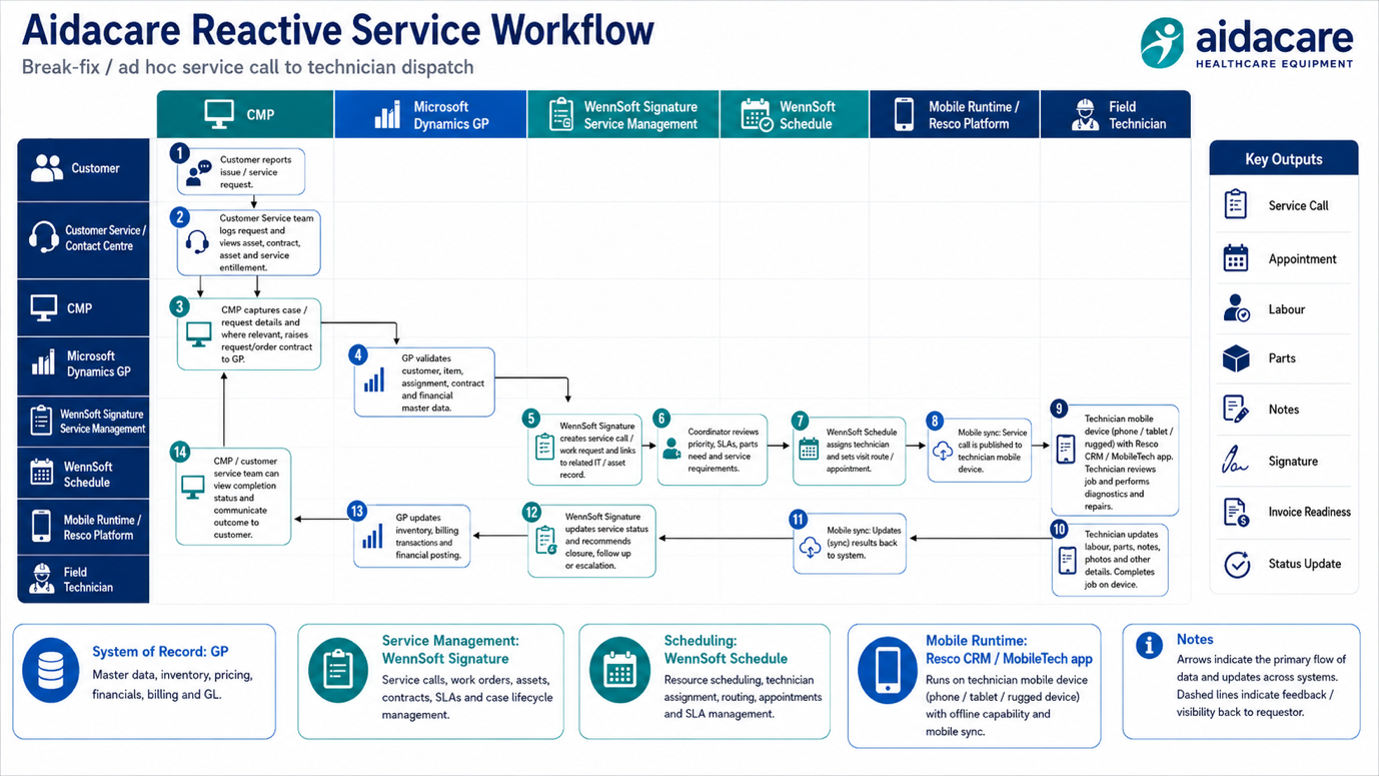
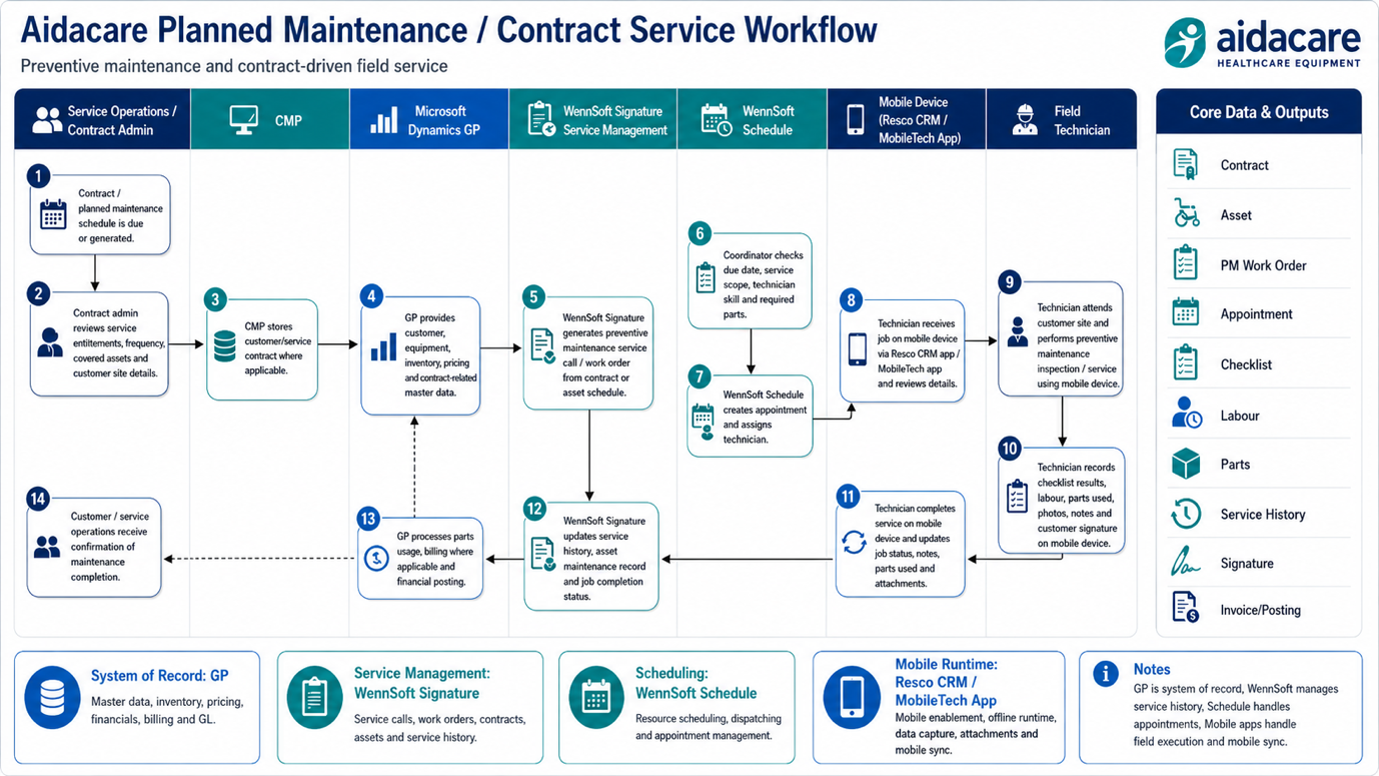
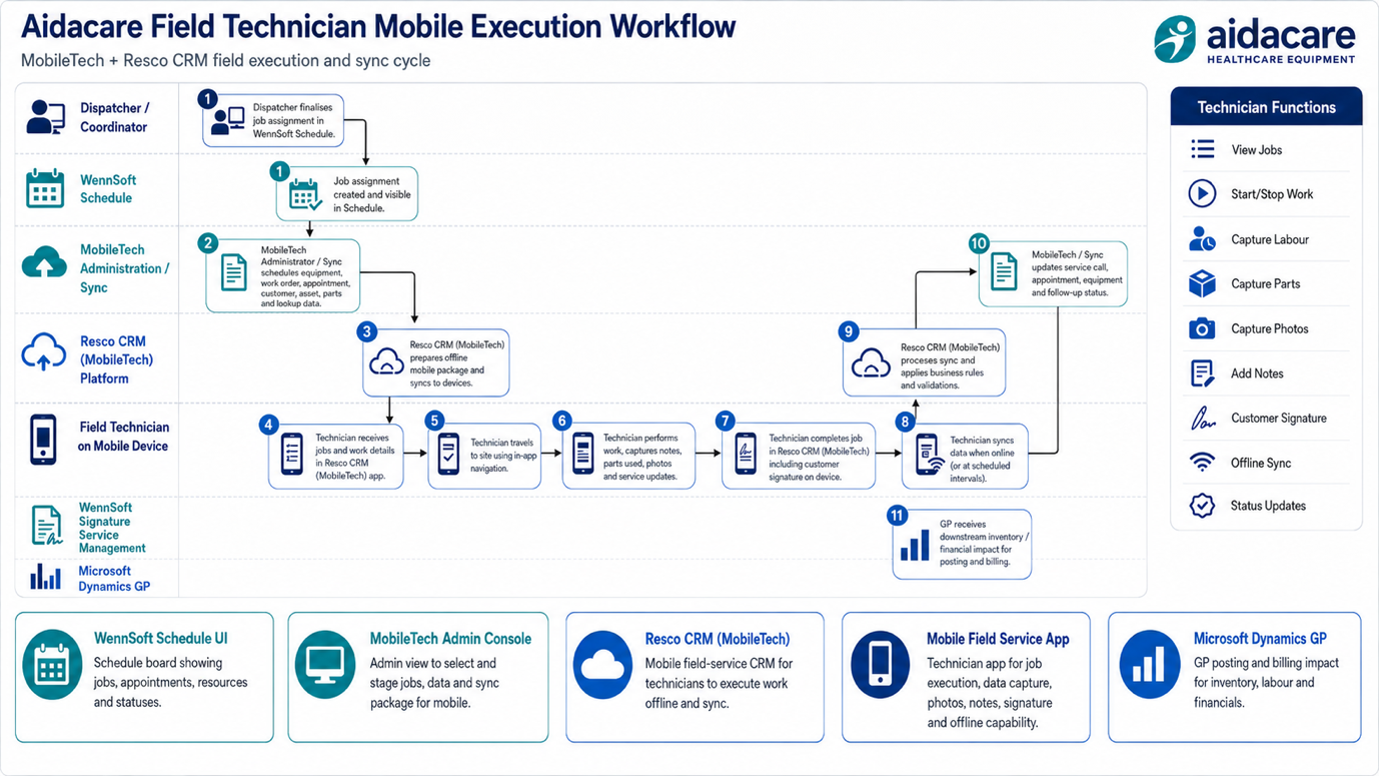
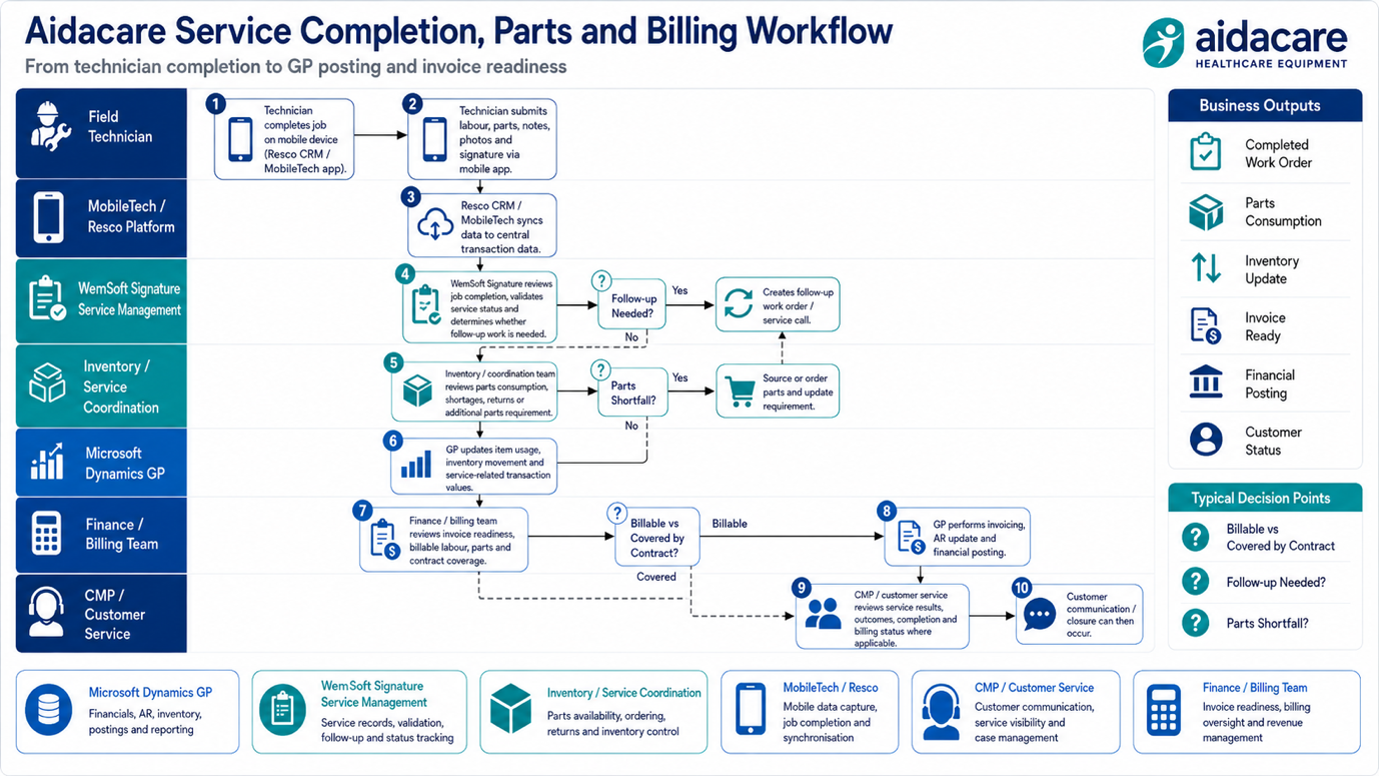
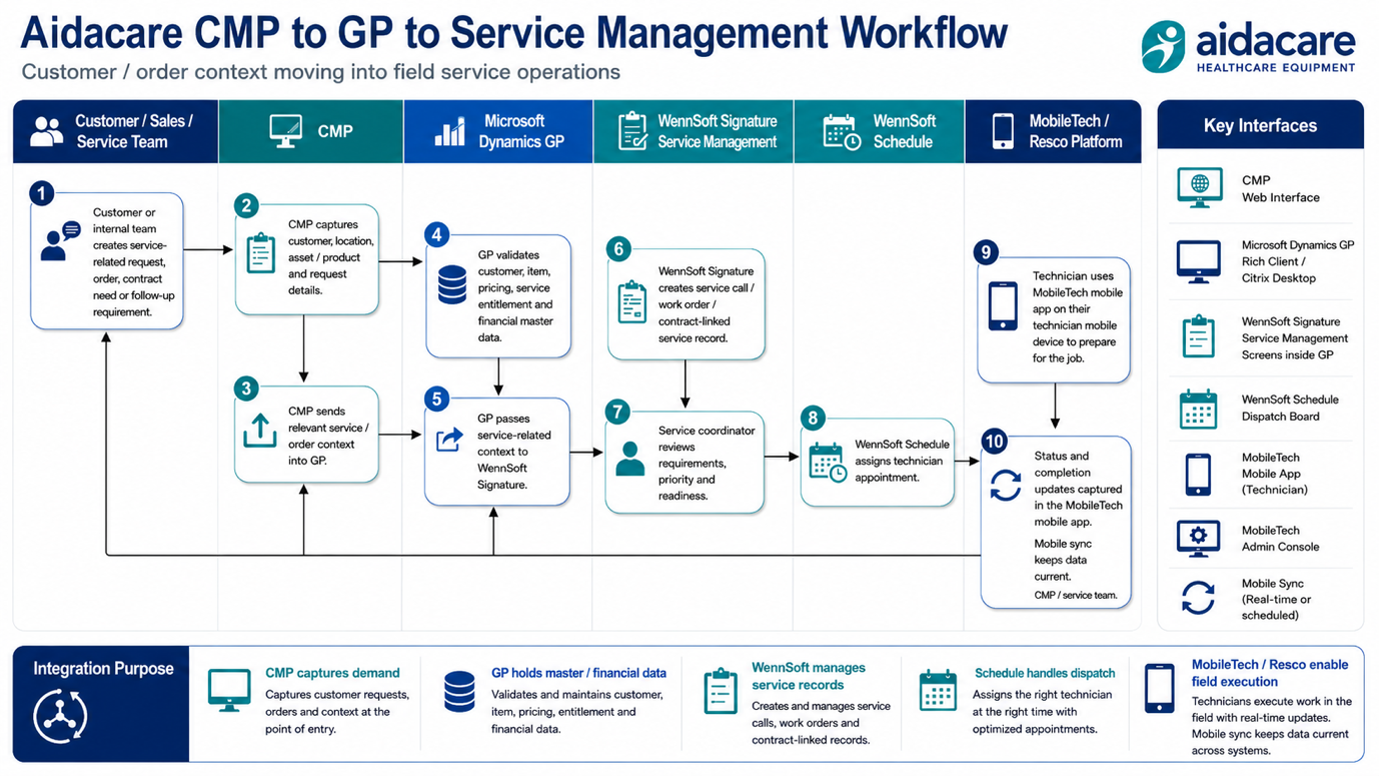
WennSoft App Screens
4 ScreenshotsApplication screen captures from the WennSoft / MobileTech / Resco field service environment — GP-integrated service management, scheduling, mobile admin, and technician mobile app views.
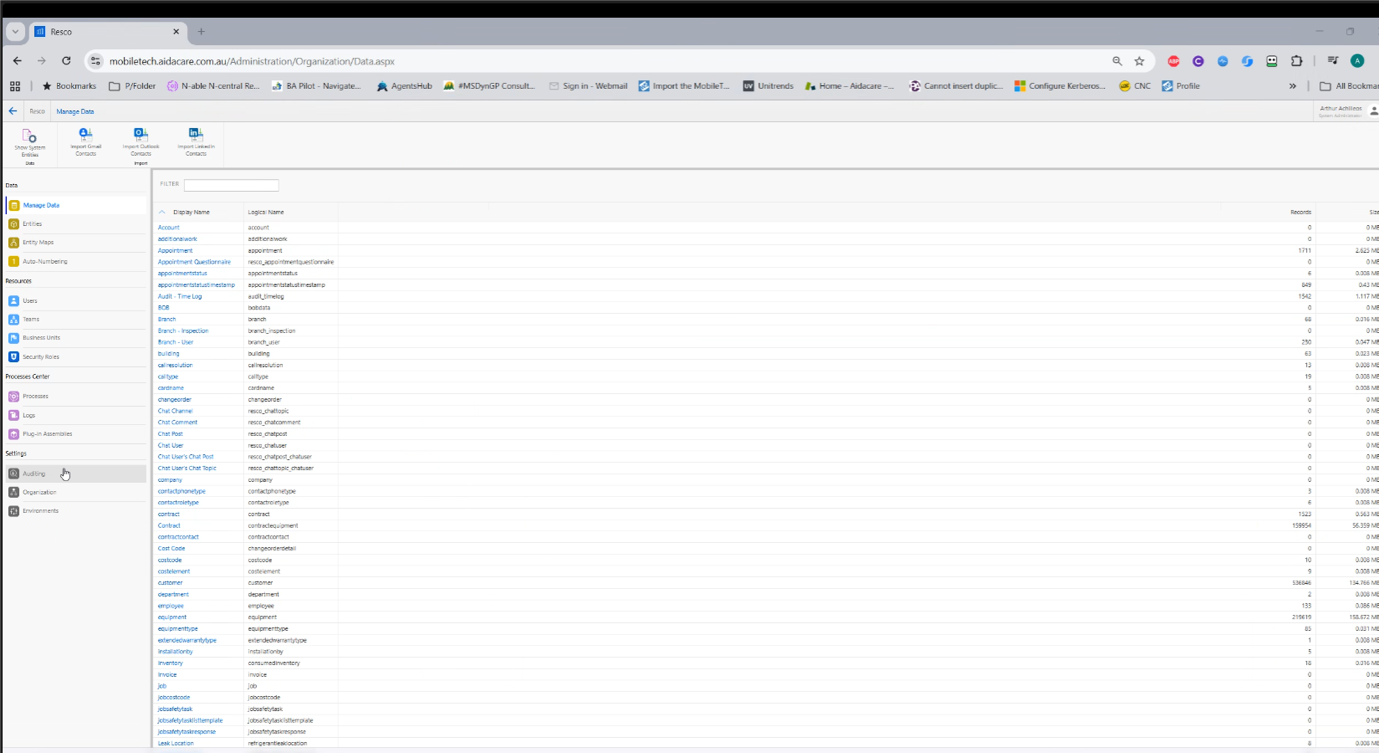
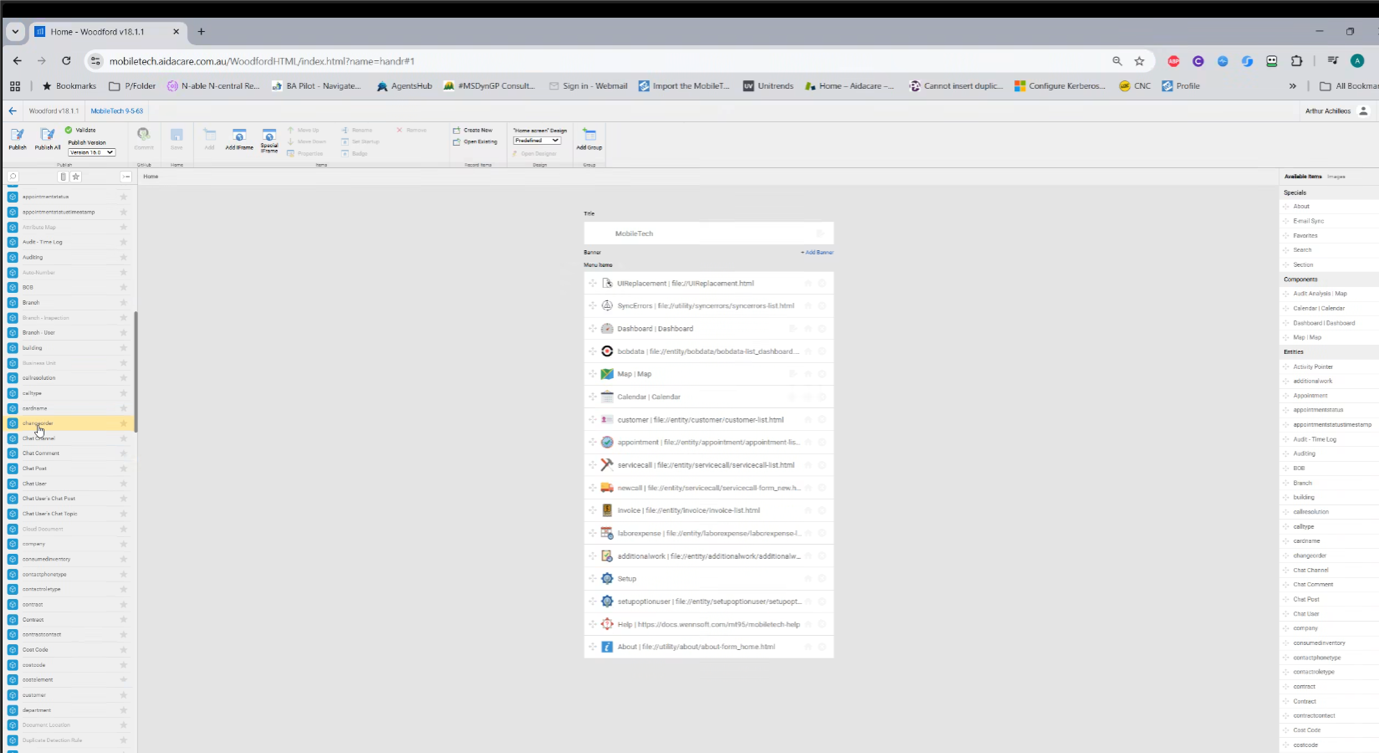
Mobile Tech
DocumentationWennSoft Mobile Tech documentation — field service mobile workflows, technician app configuration, and GP / WennSoft integration details.
Download WennSoft Mobile Tech (.docx)