ECHIA / EDI Platform
AWS-hosted EDI integration platform for automated purchase order intake, validation, pricing verification, customer/item mapping, invoice communication, and GP order creation workflows. Supported by Envisage and tightly integrated with Microsoft Dynamics GP via eConnect.
Application Overview
Tier-1 / High Risk- Full Name
- ECHIA — EDI & Order Integration Platform
- URL
- https://echia.envisageapi.com
- Business Function
- Business-critical EDI integration platform — automated purchase order intake, validation, pricing verification, customer/item mapping, invoice communication, and GP order creation workflows
- Hosting
- AWS (Amazon Web Services) — external SaaS hosting
- Vendor / Support
- Envisage — Key contact: Travis / Envisage
- Criticality
- Tier-1 / High Risk
- ERP Integration
- Microsoft Dynamics GP via eConnect-based integrations
- Pricing Integration
- OmniPrice (GP contract pricing engine)
- Source Document
- ECHIA@Aidacare.docx
Customer Types
Two Integration Modes| Customer Type | Example | Workflow Path |
|---|---|---|
|
Fully Integrated Automated |
EDI-enabled customers | ECHIA receives EDI file → automated customer/item mapping → OmniPrice pricing validation → eConnect → GP quote/order created automatically — no manual intervention |
|
Assisted / Manual Manual |
BUPA | ECHIA generates email notification → Customer Service team reviews → manually entered via CMP → GP order created by staff |
Platform Overview Diagram
ECHIA platform — overview diagram
Business Capabilities
8 Core CapabilitiesIntegration Architecture
AWS-HostedECHIA is an AWS-hosted EDI integration platform built and maintained by Envisage. It acts as the primary inbound gateway for EDI purchase orders, processing them through a series of validation and mapping stages before posting to Microsoft Dynamics GP via eConnect.
- Platform Type
- AWS-hosted EDI and order integration platform (SaaS — external to Aidacare infrastructure)
- Primary Inbound Channel
- SFTP (file-based EDI) and/or REST API — customers transmit purchase order files or API calls to ECHIA endpoints
- EDI Processing
- ECHIA parses inbound EDI files (XML/CSV), validates structure, resolves customer and item mappings, and applies pricing rules before creating GP transactions
- GP Integration Method
- eConnect — Aidacare's GP eConnect service bridges ECHIA and Microsoft Dynamics GP; transactions are posted to GP via eConnect APIs
- Pricing Integration
- OmniPrice — GP-native pricing engine. ECHIA calls OmniPrice to validate contract pricing on each order before committing to GP
- Exception Notification
- SMTP email — ECHIA sends exception notifications for failed/unresolvable orders to the relevant team (Customer Service or operations)
- Monitoring
- AWS CloudWatch — application and infrastructure logs. eConnect service logs reviewed for GP-side integration failures
- Infrastructure Owner
- Envisage (external vendor) — AWS EC2, RDS, and supporting infrastructure managed by Envisage. Aidacare has limited direct access
Architecture Diagram

ECHIA integration architecture — EDI inbound, ECHIA platform (AWS), eConnect, Microsoft Dynamics GP
ECHIA → eConnect → GP Integration Detail
Critical PathThe path from ECHIA to a posted GP order travels through eConnect — a Microsoft-provided integration service that translates eConnect API calls into GP database transactions. Failures can occur at each boundary.
Application Screenshot

ECHIA application — integration screen
ECHIA Portal — Order Processing Workflow
Fully Integrated Flow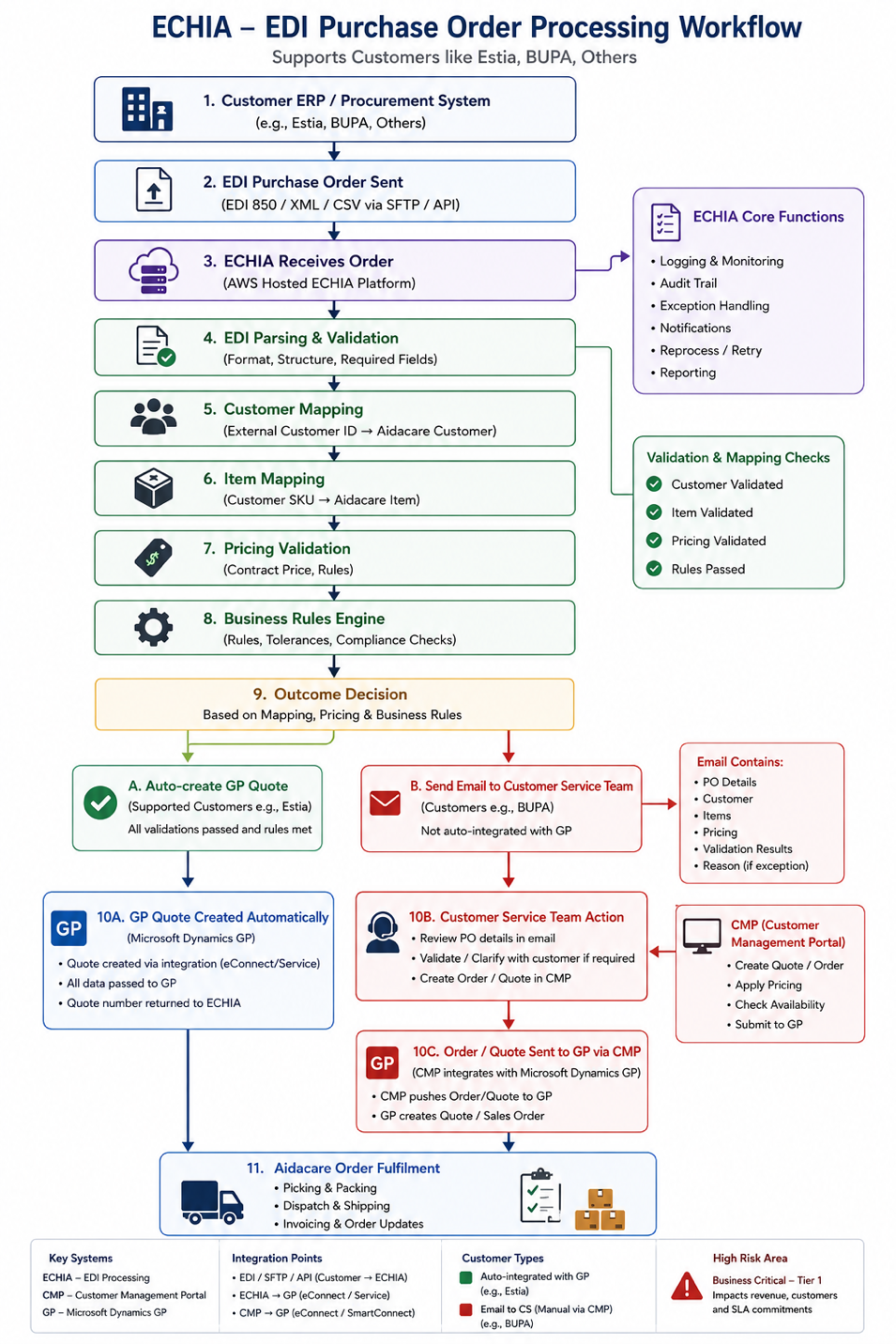
ECHIA portal — order processing workflow (app screen used to see and resolve order errors)
End-to-End Automated Order Workflow
Fully Integrated CustomersFor fully integrated customers, the entire journey from EDI file receipt to GP order creation and invoice delivery is automated — no human intervention is required under normal operating conditions.
ECHIA Portal — Additional Screen
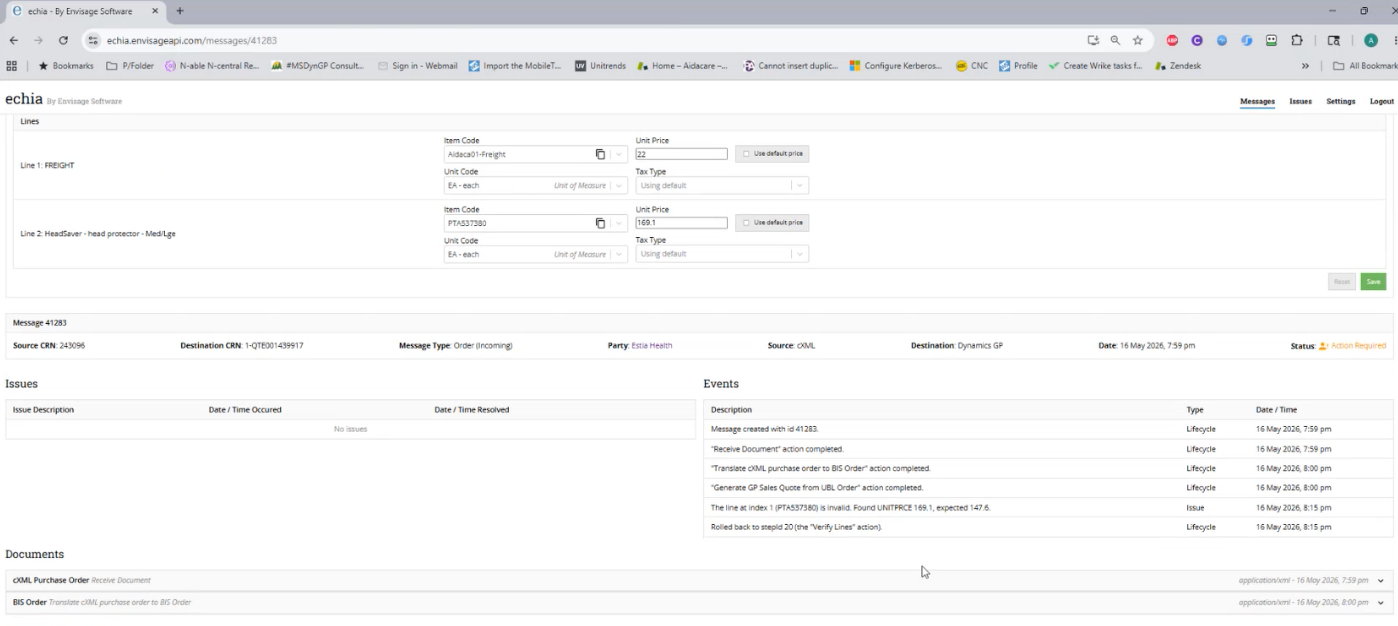
ECHIA portal — order processing and exception management screen
Assisted / Manual Workflow (e.g. BUPA)
Manual Intervention RequiredAssisted customers such as BUPA do not use the fully automated ECHIA-to-GP pipeline. Orders arrive via ECHIA-generated email and require Customer Service involvement before reaching GP.
Microsoft Dynamics GP via eConnect
Primary ERP Integration- Integration Method
- eConnect — Microsoft-provided GP integration service; ECHIA calls eConnect APIs to create SOP quotes/orders directly in GP's SQL database
- Transaction Types
- Sales Order Processing (SOP) — GP quotes and sales orders created by eConnect on behalf of ECHIA
- Service Dependency
- The eConnect Windows service must be running on the GP application server. If stopped or unresponsive, GP orders will not be created even if ECHIA processing succeeds
- Payload Format
- eConnect-compatible XML payload constructed by ECHIA from validated order data
- Error Handling
- eConnect returns structured error responses on failure (GP validation errors, SQL errors, inactive records). ECHIA logs these and places orders in exception state for review
- Common Failure Causes
- eConnect service stopped; GP SQL connectivity lost; inactive GP customer or item record; SQL deadlocks under concurrent load; malformed payload data
- Monitoring
- eConnect service logs and GP event logs — review these when GP orders are not appearing despite ECHIA reporting success
OmniPrice — Contract Pricing Integration
Pricing Engine- Integration Role
- OmniPrice is queried by ECHIA during order processing to validate that each order line's price matches the customer's contract pricing configuration in GP
- Integration Type
- API/database call — ECHIA queries OmniPrice service to retrieve contract price for the customer/item combination
- Failure Behaviour
- If OmniPrice is unavailable or returns an error, ECHIA triggers a pricing validation exception. Orders may be held pending manual pricing review
- Common Issues
- OmniPrice service outage; API/database connectivity failure; contract pricing not configured for a customer; expired contract pricing returning mismatched values
- Resolution
- Restore OmniPrice connectivity; verify and update customer contract pricing configuration in GP; temporarily apply manual pricing validation during OmniPrice downtime
- Business Impact of Failure
- Financial and compliance risk — orders processed with incorrect pricing, or orders held and delayed pending resolution
CMP — Assisted Customer Flow (BUPA)
Manual Integration Path- Integration Role
- CMP (Customer Management Portal) acts as the manual order entry intermediary for assisted customers such as BUPA — bridging the Customer Service team's manual input to GP order creation
- Trigger
- ECHIA generates an exception/notification email when an assisted customer's order is received; Customer Service responds by manually entering order details via CMP
- CMP to GP
- CMP submits the manually entered order to GP, creating the SOP order record in Microsoft Dynamics GP
- Failure Points
- Customer Service misses or delays acting on the ECHIA email; CMP is unavailable or encounters an integration error; CMP-to-GP connection fails
- Monitoring
- Customer Service team must monitor the ECHIA notification inbox. No automated monitoring of the email-to-CMP-to-GP pipeline exists — manual verification is required
- Business Impact of Failure
- Delayed customer fulfilment for BUPA and other assisted customers; potential missed orders if the email is not actioned promptly
Integration Summary
| System | Integration Type | Direction | Purpose | Criticality |
|---|---|---|---|---|
| SFTP / API | File / REST | Inbound to ECHIA | Customer EDI purchase order receipt | Critical |
| eConnect | API / Service | ECHIA → GP | GP quote and sales order creation | Critical |
| OmniPrice | API / Database | ECHIA → OmniPrice | Contract pricing validation per order line | High |
| SMTP (Email) | Email / SMTP | ECHIA → Customer | Invoice delivery and exception notifications | High |
| CMP | Manual / Web | Customer Service → GP | Manual order entry for assisted customers (BUPA) | Medium |
| AWS CloudWatch | Monitoring | AWS → Envisage | Infrastructure and application log monitoring | Medium |
ECHIA — Error / Exception Screen
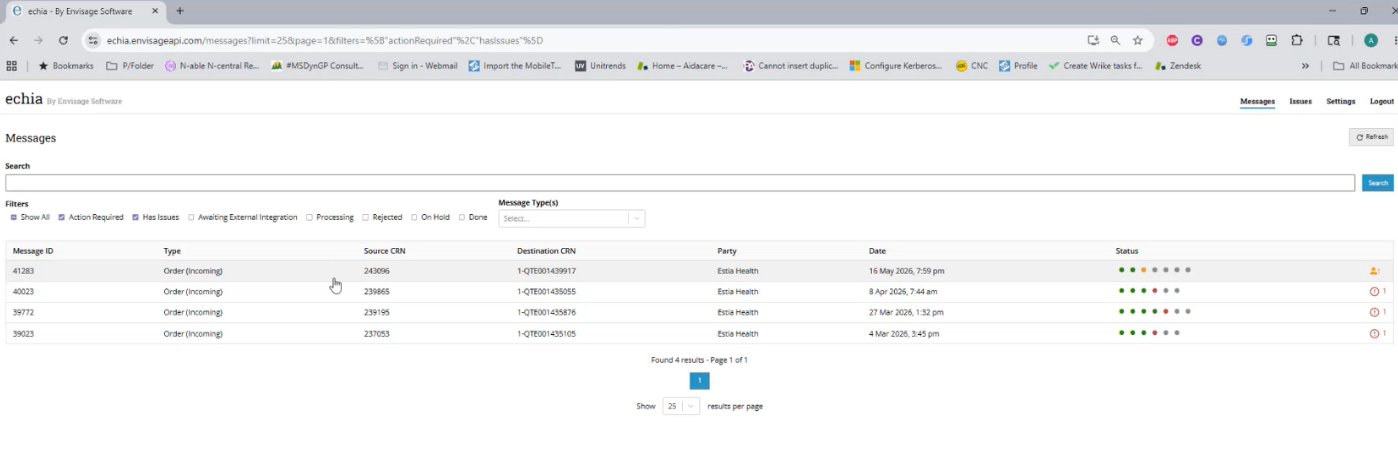
ECHIA portal — error and exception management screen (used to identify and resolve production issues)
Production Issue Reference — All Categories
17 Issue Categories| # Issue Category | Typical Symptoms | Root Causes | Troubleshooting | Resolution | Business Impact |
|---|---|---|---|---|---|
| 1. EDI Order Not Received | Customer claims PO was sent; no order visible in ECHIA | SFTP/API transmission failure; EDI file not delivered; AWS inbound connectivity issue or outage | Check inbound EDI logs in ECHIA; validate SFTP/API connectivity; review AWS CloudWatch and application logs for inbound failures | Reprocess inbound EDI file; restore SFTP/API connectivity; escalate to Envisage for AWS-level issues | Orders not processed; revenue delay; customer dissatisfaction |
| 2. EDI Parsing Failure | Order rejected at intake; invalid file format error in ECHIA | Malformed XML/CSV; missing mandatory fields; incorrect file schema or encoding | Review ECHIA parsing logs; validate payload structure against expected schema | Correct mapping/schema rules in ECHIA; request corrected file from customer; reprocess corrected file | Customer order processing failure; order not created |
| 3. Customer Mapping Failure | Customer not recognised; "invalid customer" errors in ECHIA exception log | Missing customer mapping in ECHIA; incorrect external customer ID; GP customer record inactive | Check ECHIA customer mapping tables; validate GP customer status (active/inactive) | Correct ECHIA customer mapping; activate or update GP customer record; reprocess order | Order creation blocked; GP order not created |
| 4. Item Mapping Failure | Unknown SKU errors; order lines rejected in ECHIA | Customer SKU not in ECHIA item mapping table; GP item inactive; UOM mismatch between EDI and GP | Review ECHIA item mapping tables; validate GP item setup (active, correct UOM) | Add or correct item mapping in ECHIA; reprocess order after mapping is updated | Incorrect or failed fulfilment; order lines not created in GP |
| 5. Pricing Validation Failure | Pricing mismatch on order; exception email triggered; order held pending review | Customer contract pricing mismatch vs EDI order price; OmniPrice returning incorrect values; OmniPrice service failure | Validate OmniPrice service response; compare EDI order price vs contract pricing in OmniPrice/GP | Correct pricing configuration in OmniPrice or GP; reprocess transaction after pricing is aligned | Financial risk; delayed order processing; customer impact on pricing discrepancies |
| 6. GP Quote / Order Creation Failure | ECHIA reports order processed successfully but no quote or order visible in GP | eConnect service failure or stopped; GP validation error (inactive customer/item); SQL deadlock during write | Review eConnect service logs; validate eConnect Windows service is running; check GP integration service health | Restart eConnect service; correct GP validation issue (reactivate customer/item); replay transaction from ECHIA | Order fulfilment blocked; GP has no record of order |
| 7. Duplicate Order Creation | Multiple GP quotes or orders created for the same customer PO reference | ECHIA retry logic submitting multiple times; customer resending duplicate EDI files | Compare PO references across GP SOP orders; review ECHIA retry/replay logs to identify double-submission | Cancel duplicate transactions in GP; adjust ECHIA retry logic to prevent re-submission of already-processed orders | Financial and operational risk; incorrect fulfilment quantities; stock over-commitment |
| 8. Invoice Delivery Failure | Customer reports not receiving invoice; invoice not in customer's inbox | SMTP configuration issue; invalid or changed customer email address; email blocked by customer mail server | Review ECHIA email delivery logs; validate SMTP service and configuration; confirm customer email address is correct | Resend invoice from ECHIA; update customer email address in mapping; resolve SMTP issue with Envisage | Delayed payment; cashflow impact; customer dissatisfaction |
| 9. Exception Email Not Sent | Order failed internally but no exception notification email received by team | SMTP service failure; ECHIA notification service issue; email queue stuck or not processing | Validate ECHIA notification queue status; check SMTP service health; review outbound email logs | Restart ECHIA notification service; restore SMTP connectivity; manually identify missed orders in ECHIA exception log | Missed orders; delayed processing; no visibility of failures without exception emails |
| 10. AWS Infrastructure Issue | ECHIA application completely unavailable; portal inaccessible; all order processing stopped | AWS EC2 instance outage; RDS database issue; network/security group misconfiguration blocking access | Review AWS CloudWatch logs; validate EC2 instance and RDS health in AWS console; check network security group rules | Restart affected AWS services (EC2/RDS); restore security group rules; escalate to Envisage for AWS infrastructure recovery | Major business interruption; all inbound order processing halted |
| 11. Queue Backlog / Delayed Processing | Orders delayed; slow integration throughput; orders visible in ECHIA but not yet in GP | Queue congestion from high volume; integration bottleneck or slow worker processes; stuck queue items | Review ECHIA queue depth metrics; monitor processing time per order; identify stuck or stalled queue items | Restart ECHIA worker services; clear stuck queue items; scale processing capacity if volume-driven | Delayed order fulfilment; SLA risk for customer delivery commitments |
| 12. Manual Workflow Failure (BUPA / CMP Flow) | ECHIA exception email received but no corresponding GP order created for BUPA | Customer Service missed or delayed actioning the ECHIA email; CMP integration issue preventing GP order creation | Trace the workflow from ECHIA email receipt through Customer Service action to CMP submission to GP; identify where the break occurred | Manual order creation in GP if workflow is broken; reprocess through CMP after resolving CMP-to-GP connectivity; Customer Service escalation | Delayed customer fulfilment; BUPA order not in GP; potential missed SLA |
| 13. OmniPrice Integration Failure | Pricing validation unavailable; all orders failing pricing check; OmniPrice-related errors in ECHIA logs | OmniPrice service outage; API or database connectivity issue between ECHIA and OmniPrice | Validate OmniPrice service response from ECHIA; test OmniPrice API connectivity; check OmniPrice service status | Restore OmniPrice connectivity; temporarily apply manual pricing validation for critical orders; escalate to Envisage if OmniPrice is hosted externally | Financial and compliance impact; orders held or incorrectly priced during OmniPrice outage |
| 14. eConnect Service Failure | GP transactions not posting; ECHIA processes orders successfully but nothing appears in GP | eConnect Windows service stopped; invalid eConnect payload from ECHIA; GP SQL connectivity issue | Review eConnect service logs and Windows event log; check eConnect service status on GP application server; validate GP SQL connectivity | Restart eConnect Windows service; correct invalid payload data in ECHIA mapping; restore GP SQL connectivity | ERP integration outage; no GP orders created; fulfilment blocked |
| 15. SQL Deadlocks / Performance Issues | Slow order processing; transaction failures; timeout errors during peak processing periods | Concurrent GP updates causing SQL blocking; deadlock between ECHIA/eConnect writes and other GP processes | Review SQL Server blocking and deadlock reports; identify blocking sessions using SQL activity monitor or sys.dm_exec_requests | Kill blocking SQL sessions; implement SQL query optimisation; schedule heavy ECHIA processing outside GP peak periods | Processing delays; intermittent order creation failures; GP performance degradation |
| 16. Incorrect Invoice / Customer Communication | Invoice sent to wrong customer; customer receives another customer's invoice | Customer mapping error in ECHIA sending invoice to wrong email; merge or template configuration issue in invoice generation | Validate customer mapping in ECHIA for the affected customer; review email generation logic and template configuration | Correct customer mapping in ECHIA; update email templates; resend correct invoice to correct customer; notify affected parties | Privacy and compliance risk; potential breach of customer data; reputational impact |
| 17. Application Login / Access Issues | Users cannot log in to ECHIA portal; authentication errors; access denied messages | Active Directory or authentication service issue; expired user credentials; account locked or disabled | Validate authentication logs in ECHIA; check Active Directory account status; confirm credentials are not expired or locked | Reset user credentials; unlock or reactivate AD account; engage Envisage if ECHIA-side authentication service is at fault | Operational support delays; team unable to view or resolve ECHIA exceptions |
Technical Details
IntegrationECHIA platform technical documentation — architecture, data flows, GP eConnect integration, validation rules, and operational configuration details.
Download ECHIA Platform Technical Documentation (.docx)