FreightMaster ( Sometimes also called SmartFrieght)
Multi-carrier shipping management system that converts GP Sales Orders into consignments and routes them to SmartFreight (external couriers) or Radaro (internal driver pool).
System Details
Freight & LogisticsWhat FreightMaster Does
Logic LayerFreightMaster is the Logic Layer between Dynamics GP and the two carrier platforms. It does not perform delivery itself — it creates delivery instructions and routes them to the correct carrier. It has four core functions:
FreightMaster System Screenshot
System UI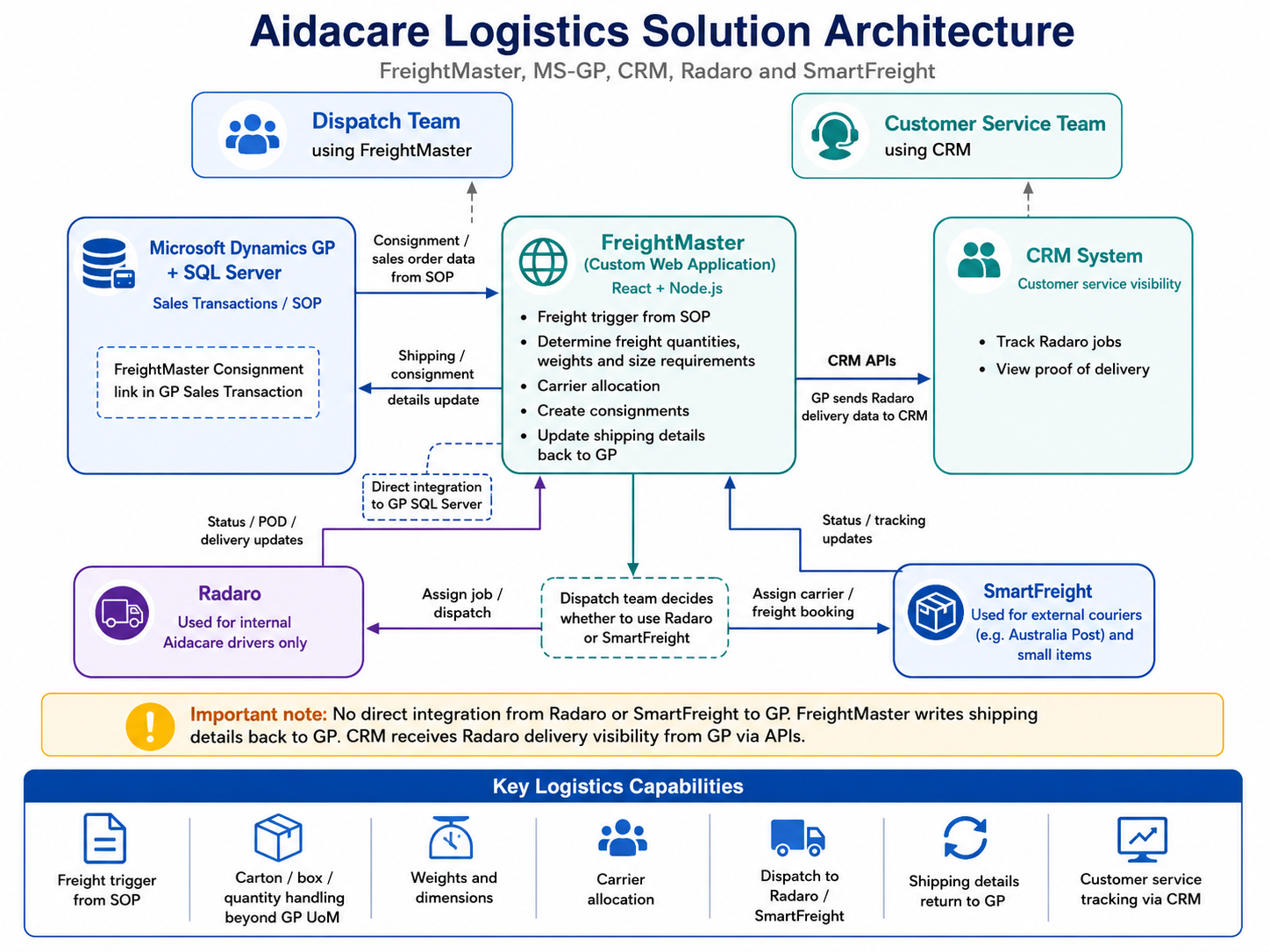
FreightMaster back-office interface — consignment management and carrier routing overview.
Three-Way Integration Architecture
GP → FreightMaster → CarriersFreightMaster sits at the centre of a three-way integration between Dynamics GP, SmartFreight (external courier SaaS), and Radaro (internal driver SaaS). It monitors GP for triggers, processes and validates orders, then dispatches to the correct carrier.
Sales Transaction Entry
AIDASMFR01V — Logic Layer
ConsignmentRequests staging
Background service
SaaS — external courier agencies
SaaS — internal Aidacare drivers
From GP → FreightMaster
TriggerFreightMaster is launched directly from the GP Sales Transaction Entry window. The GP add-in DLL (vstcontrols.smartfright.dll) monitors UI events — specifically button clicks and transaction saves — in that window. When a user saves a qualifying Sales Order, the DLL detects the transaction and initiates the hand-off to FreightMaster's SQL stored procedures.
FreightMaster also reads directly from the HANDR GP SQL database, pulling Sales Order details, customer data, and warehouse/location codes needed to build a consignment.
FreightMaster → SmartFreight
External CouriersWhen the carrier/shipping method on a Sales Order resolves to an external courier, FreightMaster identifies this and a background service ("The Messenger") picks up the staged consignment record from the HANDR database. It converts the record to a JSON payload and pushes it to the SmartFreight API over HTTPS.
SmartFreight then assigns the delivery to an external courier agency. API details are TBC.
FreightMaster → Radaro
Internal DriversWhen the carrier/shipping method resolves to Aidacare's internal driver pool, FreightMaster pushes the consignment to the Radaro API. The same background service constructs the JSON payload and transmits it over HTTPS to Radaro's cloud platform, where a delivery job is created and assigned to a driver.
Radaro returns a Job ID upon success; this ID is written back into the HANDR database (consignmentNo column) to link the GP order to the Radaro job.
Carrier Response → GP (HANDR)
Write-backFreightMaster is directly integrated with the GP SQL database (HANDR). After a carrier accepts a consignment and returns a success response, the background service updates the HANDR staging tables: status is set to Imported (3), the carrier's Job ID is recorded in ConsignmentRequestReferences, and the action is logged in ConsignmentRequestHistory.
This creates a closed-loop audit trail entirely within the HANDR database.
Architecture — System Screenshot
Reference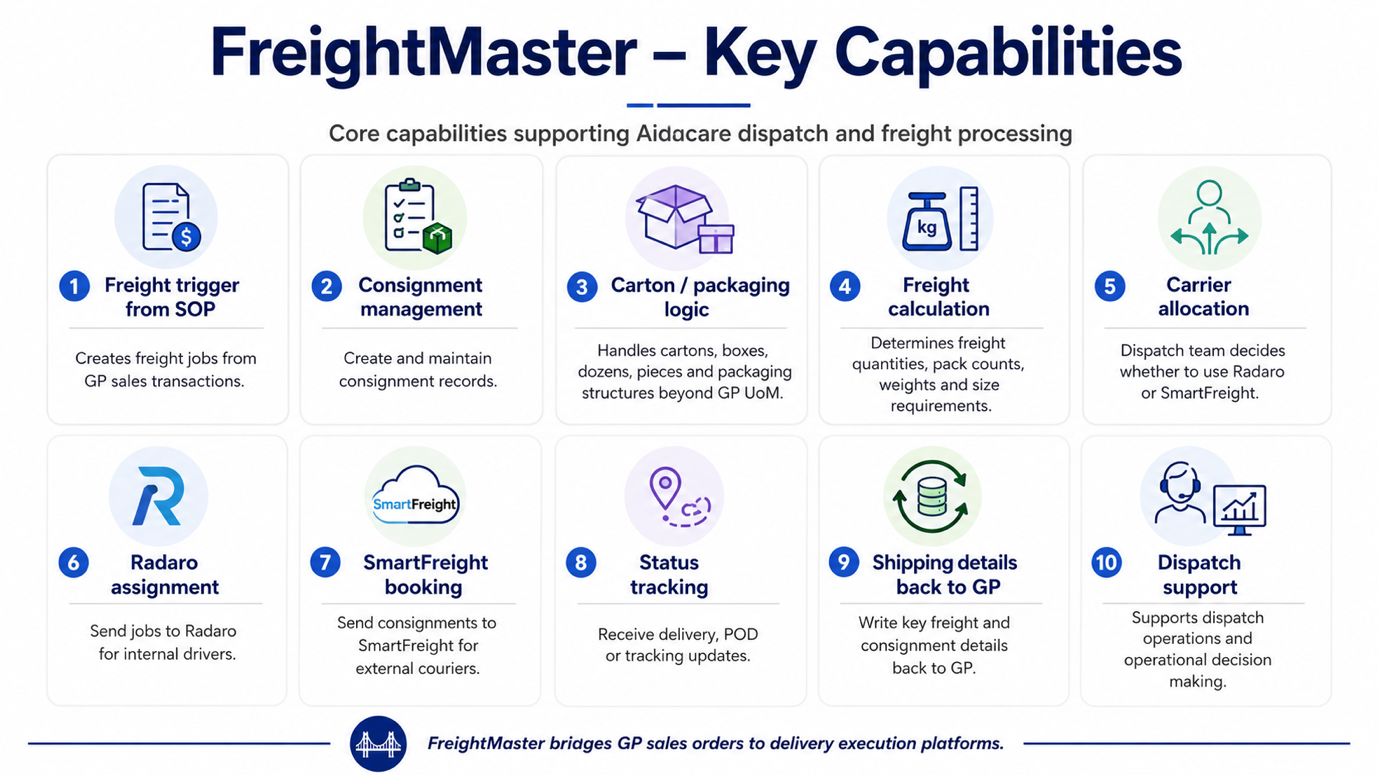
FreightMaster architecture — illustrating the integration between Dynamics GP, FreightMaster, SmartFreight, and Radaro.
End-to-End Flow: GP → FreightMaster → Radaro / SmartFreight
6 StepsThe following six steps describe the complete lifecycle of a delivery from the moment a Sales Order is entered in Dynamics GP through to confirmation of delivery job creation in the carrier platform.
vstcontrols.smartfright.dll) detects the transaction event. This DLL "hooks" into the GP user interface, monitoring button clicks and save events in the Sales Transaction window to trigger FreightMaster logic.
smartFreightConsignmentRequestCreate stored procedure in the HANDR database. This stored procedure reads the full Sales Order details from GP's SOP tables, translates the data into the Consignment format, and writes a new record into the ConsignmentRequests staging table with a status of Draft (1). At this point the consignment exists in HANDR but has not yet been sent to any carrier.
ConsignmentRadaroApiKeyMappings table to ensure a valid API key exists for the warehouse/location associated with the order. It also validates that the delivery address, phone number, and location codes are present and correctly formatted. If validation fails, the record is marked as Failed (4) and the error is logged in ConsignmentRequestHistory. No carrier API call is made.
ConsignmentRequests table for records with Draft status. When it finds one, it converts the consignment record into a JSON payload and dispatches it via HTTPS to the appropriate carrier API — either Radaro or SmartFreight — based on the carrier/shipping method resolved during logic processing. The status is updated to Processing (2) while the API call is in flight.
consignmentNo column of ConsignmentRequests, and the complete timeline is recorded in ConsignmentRequestHistory. The GP order is now fully linked to the carrier job via ConsignmentRequestReferences.
Record created in HANDR
API call in flight
Carrier accepted
Validation or API error
If a push fails (status 4), the error detail is recorded in ConsignmentRequestHistory. The record must be corrected and re-submitted manually.
End-to-End Flow — Screenshot Reference
Reference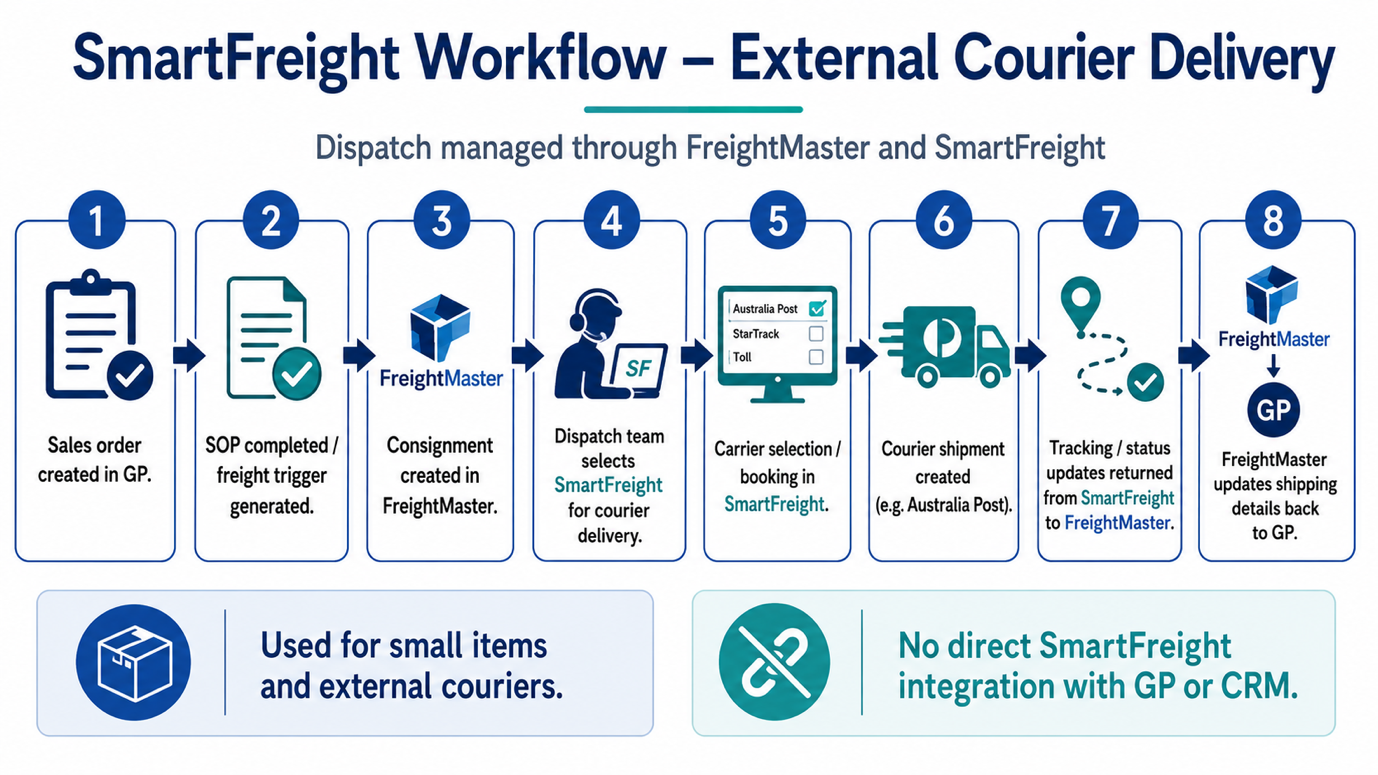
Visual reference for the GP to FreightMaster to Radaro/SmartFreight end-to-end consignment flow.
What is SmartFreight?
SaaS — External CourierSmartFreight is a freight management SaaS platform used to dispatch deliveries to external courier agencies. When FreightMaster determines a consignment should go to an external courier (based on the carrier/shipping method on the GP Sales Order), it routes the consignment through the SmartFreight API.
SmartFreight handles carrier selection, label generation, and tracking for these external deliveries, operating entirely in the cloud with no on-premises components at Aidacare's side.
FreightMaster → SmartFreight Integration
Push ModelHow the Integration Works
ConsignmentRequests in HANDR with status Draft (1) by the smartFreightConsignmentRequestCreate stored procedure.
ConsignmentRequestReferences.
SmartFreight Integration — Screenshot Reference
Reference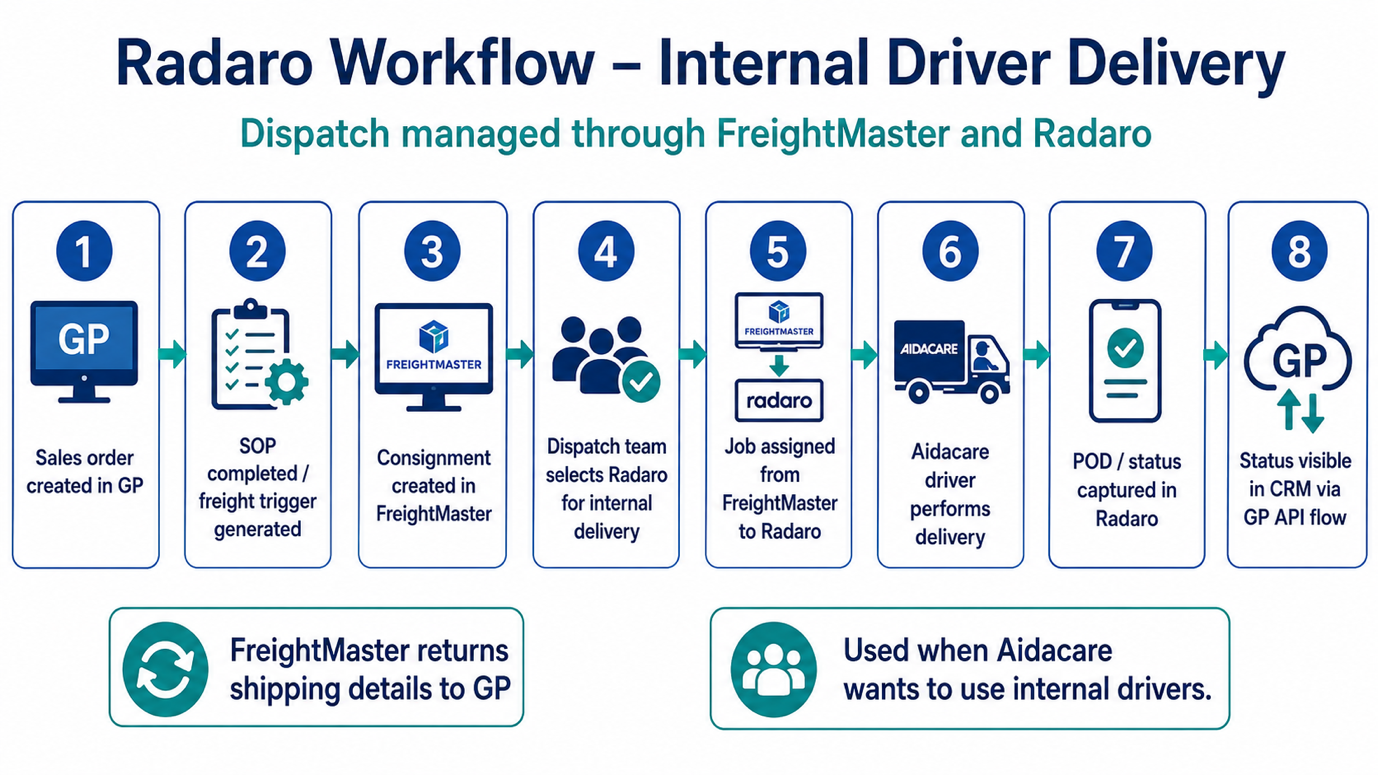
SmartFreight integration reference — consignment routing to external courier agencies via the SmartFreight SaaS platform.
What is Radaro?
SaaS — Internal DriversRadaro is a cloud-based enterprise logistics and last-mile delivery management platform. Aidacare uses Radaro to manage its internal driver pool — staff drivers who perform deliveries directly rather than using third-party courier agencies. Radaro provides four core capabilities:
How Radaro Connects to GP
Staging & Sync ModelRadaro does not connect directly to Dynamics GP. FreightMaster acts as the intermediary, using the HANDR database as a staging area. The connection follows a Staging and Sync model:
ConsignmentRequests (status: Draft).
ConsignmentRadaroApiKeyMappings is checked to retrieve the correct Radaro API credentials for the dispatching warehouse/location.
consignmentNo and ConsignmentRequestReferences.
ConsignmentRequestHistory.Radaro Integration Tables (HANDR Database)
7 Tables| Table Name | Role | Key Data |
|---|---|---|
ConsignmentRequests |
Master header table — primary staging table linking GP to Radaro | Links GP SOPNUMBE (Sales Order number) to Radaro job details, including consignmentNo (Radaro Job ID) |
ConsignmentRadaroApiKeyMappings |
Stores unique Radaro API credentials per GP Warehouse/Location | Per-location API keys and endpoint configuration — used by smartFreightConsignmentRequestSecurity to authenticate each push |
ConsignmentRequestStatus |
Reference table defining the consignment lifecycle states | Status codes: 1 = Draft, 3 = Imported, 4 = Failed |
ConsignmentRequestHistory |
Audit log tracking every status change, API response, and timestamp | Full timeline of events including API error messages when a push fails — primary troubleshooting table |
ConsignmentRequestReferences |
Cross-reference table between GP and Radaro external identifiers | Maps internal GP Order Numbers to external Radaro Job IDs and carrier reference numbers |
ConsignmentRequestRadaroLabels |
Metadata tags to categorise and identify jobs within the Radaro dashboard | Label metadata applied to Radaro jobs — supports filtering and categorisation in the Radaro platform |
ConsignmentRequestRadaroDriverSkills |
Maps specific driver capability requirements to delivery jobs | Driver skill tags (e.g., "Heavy Lift", "Specialist Equipment") — ensures correct driver type is assigned to specialist deliveries |
Radaro Stored Procedures (HANDR)
2 ProceduresThe main engine stored procedure for creating new delivery requests. Gathers all relevant data from GP's SOP (Sales Order Processing) tables, translates it into the consignment format, and populates the ConsignmentRequests staging table. This is the first stored procedure called when a GP Sales Order triggers FreightMaster.
Handles authentication logic for the Radaro API. Validates the API keys stored in ConsignmentRadaroApiKeyMappings for the specific warehouse/location code on the consignment, ensuring the correct credentials are used before any data is transmitted to the Radaro cloud. Prevents unauthorised API calls and cross-location credential mismatches.
Radaro Platform — Screenshot Reference
Reference
Radaro last-mile delivery management platform — driver dispatch, live tracking, and delivery job management.
HANDR Database — Consignment Tables
4 Core Tables| Table Name | Description | Lifecycle Role | Key Columns / Notes |
|---|---|---|---|
ConsignmentRequests |
Primary staging table where GP Sales Order data is stored after being "logicalized" by FreightMaster. This is the master record for every consignment. | Created when a GP Sales Order is submitted to FreightMaster. Exists throughout the full lifecycle. | consignmentNo — stores the carrier-issued Job ID (Radaro or SmartFreight) after successful push. Links to GP SOPNUMBE. |
ConsignmentRequestStatus |
Reference / lookup table that defines all valid lifecycle states for a consignment. Controls what status transitions are valid. | Tracks current status of each consignment throughout its lifecycle: Draft → Processing → Imported (or Failed). | Status codes: 1 = Draft, 2 = Processing, 3 = Imported, 4 = Failed |
ConsignmentRequestHistory |
Append-only audit log that records a timestamped entry for every action taken on a consignment — status changes, API calls, success responses, and error messages. | Audit trail and error diagnostics. First place to check when a consignment fails or is stuck. | Contains full API error messages when a push to Radaro or SmartFreight fails. Essential for troubleshooting. |
ConsignmentRequestReferences |
Cross-reference mapping table that links internal GP Order Numbers to external carrier-assigned IDs from Radaro or SmartFreight. | Post-import — used for tracking, reconciliation, and linking carrier events back to the originating GP order. | Maps GP SOPNUMBE to Radaro Job IDs and SmartFreight Carrier IDs. Used to look up delivery status in carrier portals. |
Stored Procedures (HANDR Database)
2 ProceduresBoth stored procedures reside in the HANDR database and form the SQL-side core of FreightMaster's GP integration. They are called by the GP DLL add-in and by FreightMaster's NodeJS application layer.
GP Add-in Logic File — vstcontrols.smartfright.dll
GP Addins Folder
File Details
vstcontrols.smartfright.dllRole & Behaviour
- Hooks into the GP UI: Registers event listeners against the Dynamics GP Sales Transaction Entry window
- Monitors UI events: Watches for button clicks (e.g., Save, Post) within the Sales Transaction window
- Triggers FreightMaster logic: On the qualifying event, calls
smartFreightConsignmentRequestCreatestored procedure in HANDR - Bridge role: Acts as the hand-off mechanism between the GP window and the FreightMaster SQL layer — the human-to-machine trigger point
- No carrier calls: The DLL itself does not push to SmartFreight or Radaro APIs — that is the background service's responsibility
Full Table Reference — Radaro Integration (HANDR)
7 Tables| Table Name | Purpose |
|---|---|
ConsignmentRequests |
Master header table. Links GP SOPNUMBE to Radaro job details. Contains consignmentNo (Radaro Job ID written back after successful push). |
ConsignmentRadaroApiKeyMappings |
Stores unique Radaro API credentials for each GP Warehouse/Location code. Used by the security stored procedure to authenticate each API call correctly. |
ConsignmentRequestStatus |
Lifecycle state reference. Values: 1 = Draft, 3 = Imported, 4 = Failed. Controls valid state transitions for every consignment record. |
ConsignmentRequestHistory |
Append-only audit log. Every status change, API call, success message, and error message is timestamped here. Primary table for troubleshooting failed consignments. |
ConsignmentRequestReferences |
Cross-reference between GP internal order numbers and external Radaro Job IDs / carrier reference numbers. Used for tracking and reconciliation. |
ConsignmentRequestRadaroLabels |
Metadata label tags applied to Radaro jobs. Allows jobs to be categorised, filtered, and identified within the Radaro dispatcher dashboard. |
ConsignmentRequestRadaroDriverSkills |
Maps specific driver capability requirements to consignment jobs — e.g., "Heavy Lift", "Specialist Equipment handling". Ensures the correct driver type is assigned in Radaro. |
Technical Details
IntegrationFreightMaster end-to-end flow and database mapping documentation — consignment lifecycle, HANDR table mappings, and GP integration details.
Download FreightMaster End-to-End Flow & Database Mapping (.docx)