POS System (Envisage)
Custom React/NodeJS retail Point of Sale platform built by Envisage for Aidacare — integrated with GP via the HANDLR SQL database, Westpac PayWay for card-not-present payments, and Linkly/EFTPOS for in-store terminal payments.
System Details
Envisage POSArchitecture & Integration Points
3 integrationsThe POS platform is a custom React/NodeJS web application hosted on AIDAPOS01V. It integrates with three external systems:
Integration 1 — HANDLR (GP) Direct SQL
POS connects directly to the HANDLR GP SQL Server database. This is the primary integration — sales, inventory, customer data and invoices are read and written via direct SQL. There is no GP API or eConnect layer; POS operates directly against the GP database tables.
Integration 2 — EFTPOS via Linkly (in-store card payments)
Physical card machines are connected through Linkly middleware. POS sends a payment request to Linkly; Linkly communicates with the EFTPOS terminal; Westpac merchant services handle bank authorisation. See the EFTPOS Flow tab for the full 10-step data flow.
Integration 3 — Westpac PayWay (card-not-present)
PayWay handles online, phone, stored card, API-based, and recurring payments. It is integrated into both POS and MS-GP (via the AIDACARE.DIC Dexterity customisation). See the PayWay tab for GP customisation details.
AIDAPOS01V
GP SQL Server
EFTPOS middleware
Card-not-present
POS System Overview — 6 Core Capabilities
Retail OperationsThe POS is a custom retail Point of Sale platform tailored specifically for Aidacare retail operations. It enables retail staff to perform the following functions, all tightly integrated with Microsoft GP:
GP Integration Benefits
POS Architecture — Source Document Screenshot
POS architecture — from POS@Aidacare.docx source document
EFTPOS / POS Data Flow — Source Document Screenshot
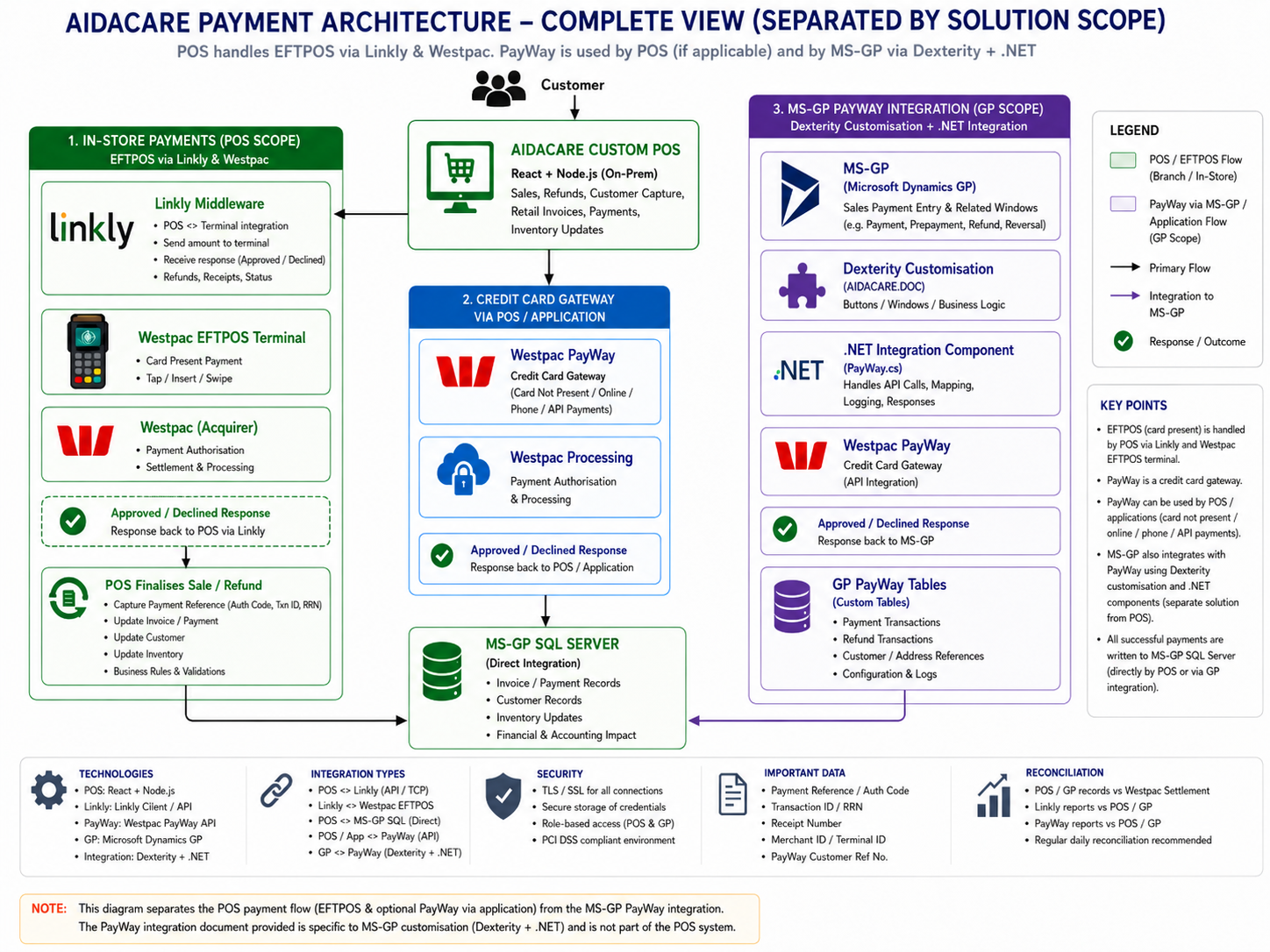
EFTPOS/POS data flow — from POS@Aidacare.docx source document
EFTPOS Data Flow — 10-Step Breakdown
Full end-to-end flow| # | From | To | Data / Action | Via | Notes |
|---|---|---|---|---|---|
| 1 | POS user / session | POS | User selects "Pay by EFTPOS" | UI action | Staff initiates payment type selection in POS |
| 2 | POS | Linkly | Payment request: transaction type, amount, invoice/receipt reference, terminal/register details | Linkly API | POS sends full payment request to Linkly middleware |
| 3 | Linkly | EFTPOS terminal | Transaction amount appears on terminal display | Linkly → terminal | Staff must not manually key the amount — it is pushed by Linkly |
| 4 | EFTPOS terminal | Customer / card | Tap / insert / swipe / PIN entry | Physical terminal | Customer presents card at terminal; terminal captures card data |
| 5 | EFTPOS terminal | Westpac | Authorisation request sent to Westpac / bank network | Linkly connects POS to terminal; Westpac/bank network handles authorisation | Westpac merchant services process the authorisation with card-issuing bank |
| 6 | Westpac | EFTPOS terminal | Authorisation result: Approved / Declined / Cancelled / Timeout | Westpac payment network | Bank authorisation result returned to terminal |
| 7 | EFTPOS terminal | Linkly | Transaction response (terminal/payment response) | Linkly middleware | Linkly receives the terminal/payment response |
| 8 | Linkly | POS | Approved/declined response, transaction reference, receipt data | Linkly API response | IMPORTANT: HTTP 200/202 does NOT mean payment succeeded — must inspect actual EFT response (approved/declined flag, response code) |
| 9 | POS | POS database / MS-GP SQL | Finalise sale / refund / payment / inventory update | Direct SQL to HANDLR | Only after confirmed approval — POS writes to GP database to complete the transaction |
| 10 | POS / Finance | Westpac / settlement reports | Daily reconciliation against Westpac settlement report | Westpac merchant portal / reports | Finance team reconciles POS daily takings with Westpac settlement and GP cash receipts |
Data Sent: POS → Linkly / EFTPOS
Request payload| Field | Description |
|---|---|
| Transaction type | Purchase, refund, reversal, status enquiry, or logon |
| Amount | Sale or refund amount in cents |
| POS transaction ID / receipt number | Unique POS-side reference for the transaction |
| Register / terminal identifier | Identifies which physical terminal to route payment to |
| Merchant / terminal configuration | Merchant ID, terminal ID, and Linkly connection settings |
| Refund reference | Original transaction reference (for refund transactions) |
| Optional fields | Surcharge, cash-out amount, tipping fields (where applicable) |
Data Returned: Linkly / EFTPOS → POS
Response payload| Field | Description |
|---|---|
| Approved / declined flag | The definitive approval result — POS must read this, not just HTTP status |
| Response code / response text | Bank/gateway response code and human-readable description |
| Approval code | Bank-issued authorisation code (only present on approved transactions) |
| Receipt number / RRN / RFN | Transaction reference, Retrieval Reference Number, Reference Number for reconciliation |
| Terminal ID / merchant ID | Identifies the terminal and merchant account that processed the payment |
| Receipt content | Full receipt text for printing (customer and merchant copies) |
| Status result | Final transaction status for POS to determine next action (finalise, retry, or abort) |
Westpac PayWay — Overview
Card-not-presentWestpac PayWay is Aidacare's gateway for non-physical card payments — it handles any payment scenario where a physical card machine is not involved.
PayWay Data Flow
GP Customisation — AIDACARE.DIC
Dexterity + .NETA GP Dexterity customisation (AIDACARE.DIC) developed by Maksud Halai integrates PayWay directly into the GP Sales Payment Entry window, enabling finance staff to process payments without leaving GP.
AIDACARE.DIC (Dexterity dictionary)Custom Windows Added
HsPayWayCustomerMaintenance
— Customer maintenance for PayWay
SopPaymentEntry
modified
— Sales Order Payment Entry
HsPayWayRefundEntry
— PayWay refund entry
HS_PayWay_Login_Setup
— PayWay login configuration
HS_PayWay_Setup
— PayWay system setup
PayWay Integration — Source Document Screenshot

Westpac PayWay Credit Card Payment Integration — from GP Modification Docs / PayWay Credit Card Payment Integration.docx
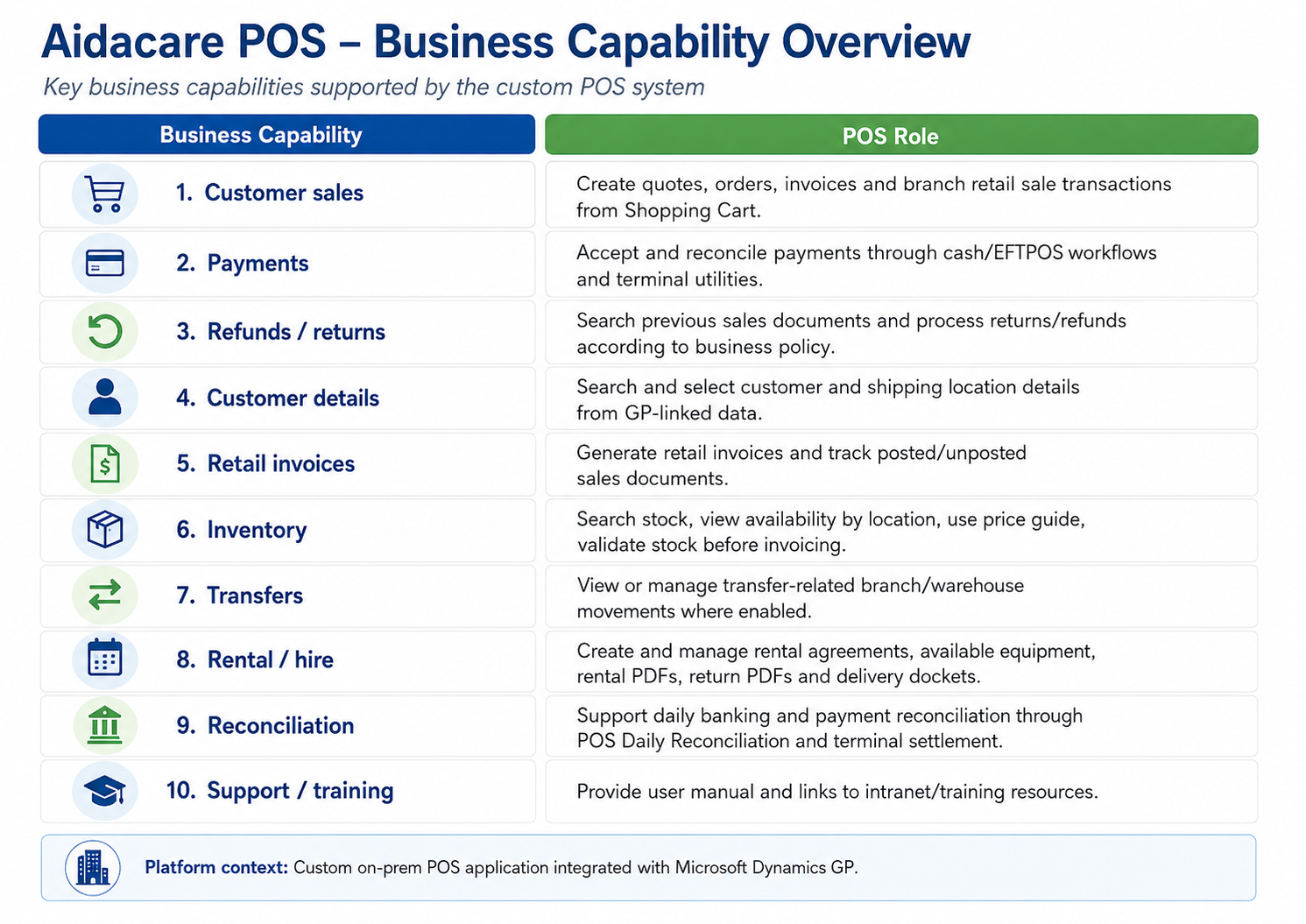
Core POS Capabilities
6 capabilities1 Process Customer Sales
Retail staff can process complete point-of-sale transactions — item lookup, quantity, pricing (sourced from GP price lists), tax calculation, and sale finalisation. The POS presents a user-friendly interface while writing the transaction directly to the HANDLR GP database.
2 Accept Payments
The POS supports multiple payment methods within a single sale: cash, EFTPOS via Linkly (physical terminal), and card-not-present via Westpac PayWay. Split payments are supported. Payment outcomes are reconciled with GP and Westpac settlement reports.
3 Handle Refunds
Refunds are processed via the POS with reference to the original transaction. The POS sends a refund request through Linkly (for EFTPOS refunds) or PayWay (for card-not-present refunds). The GP database is updated to reflect the credit. Refund eligibility rules apply.
4 Capture Customer Details
Customer lookup and creation within the POS is linked to the GP customer master in HANDLR. This ensures centralised customer management — details entered at POS are available across GP, and vice versa.
5 Process Retail Invoices
Sales generate retail invoices in real time. Invoice records are written directly to the GP HANDLR database (SOP tables), enabling financial reconciliation between POS retail sales and GP accounts receivable without manual re-entry.
6 Update Inventory
Each POS sale decrements stock in the correct GP site/warehouse in real time. This provides accurate inventory visibility across all Aidacare retail branches and ensures consistent stock levels between physical retail and the GP inventory module.
EFTPOS & Westpac Merchant Services
Payment infrastructureEFTPOS — Physical In-Store Payments
Physical card machines at Aidacare retail branches accept tap, insert, swipe, and PIN transactions. These terminals are connected to the POS through Linkly middleware (formerly PC-EFTPOS). Linkly acts as the bridge between the POS software and the physical terminal hardware.
Westpac Merchant Services
Westpac is Aidacare's merchant bank for both EFTPOS terminal payments and PayWay card-not-present payments. Westpac processes authorisations via the card network (Visa/Mastercard etc.) and provides daily settlement reports used for reconciliation.
POS Capabilities — Source Document Screenshot
POS capabilities — from POS@Aidacare.docx source document
POS Application Issues
pos.aidacare.com.au / www.pos.aidacare.com from affected machine and from another device.EFTPOS / Terminal Issues
Refund Issues
GP / Inventory / SQL Issues
Issue Severity Classification Matrix
POS / EFTPOS / PayWay| Severity | Example Scenario | Immediate Action |
|---|---|---|
| P1 |
All branches cannot process POS / EFTPOS payments Complete POS outage — no register at any branch can process a sale or accept any form of payment. |
Immediate escalation to POS team (Envisage), infrastructure team, Linkly/Westpac, and GP team simultaneously. Activate business continuity (manual receipts). Notify management. |
| P2 |
One branch cannot process EFTPOS payments Single branch EFTPOS is down — other branches unaffected. Cash and PayWay may still be available. |
Apply branch-level workaround (cash, PayWay). Investigate terminal and Linkly at affected branch. Escalate to Linkly/Westpac if terminal hardware issue. Engage Aidacare GP team. |
| P2 |
Payment approved on terminal/PayWay but GP or POS not updated Money has left the customer's account but no GP invoice or POS record was created. Risk of double-charge if retried. |
Stop all retry attempts immediately. Confirm payment status via Linkly/Westpac reference. Manually reconcile the transaction with finance approval. Correct GP records. Do not reprocess until confirmed. |
| P3 |
Individual invoice / customer / inventory sync issue A single transaction did not write correctly to GP — wrong stock site, missing invoice, duplicate, or customer data mismatch. |
Investigate POS and GP logs for the specific transaction. Correct the transaction/master data in GP with appropriate approval. Log for Envisage review if pattern emerges. |
| P4 |
Receipt print issue / user setting issue / daily banking view issue Non-critical cosmetic or configuration issue — payments and GP data are intact, no financial risk. |
Standard support fix. Review POS user/branch settings, printer configuration, or daily banking report filter. Escalate to Envisage if configuration change is needed. |
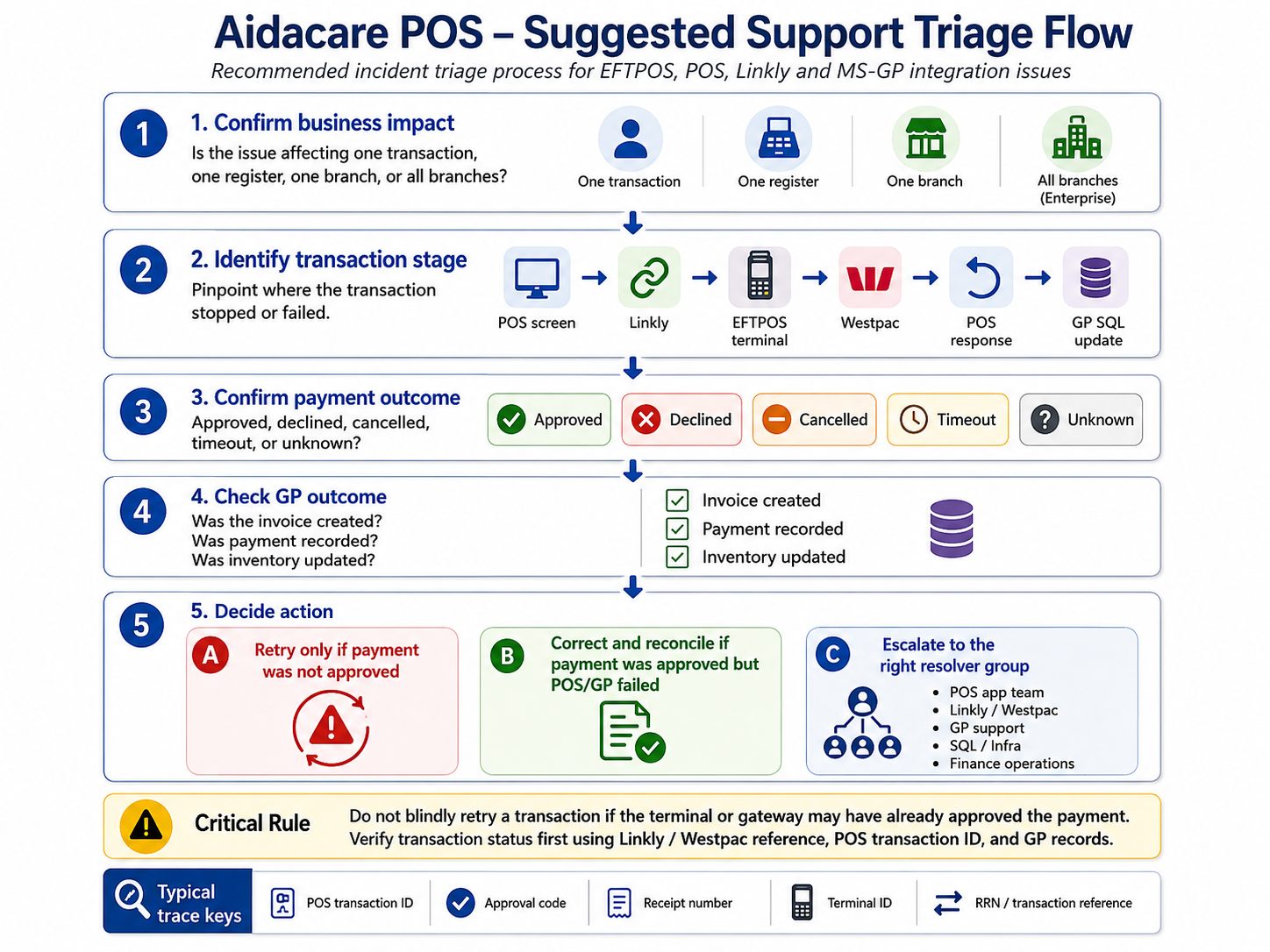
POS Triage Guidance — First Steps for Any POS Issue
Use before escalatingKey reminder: An HTTP 200/202 from Linkly does not confirm payment success. Always read the EFT response body. When in doubt about a payment outcome — check the Linkly log and Westpac merchant portal before taking any corrective action or reprocessing.
POS User Manual
DocumentationEnd-user guide for the Envisage POS system — retail operations, payments, refunds, and day-to-day POS workflows.
View POS User Manual (.pdf)